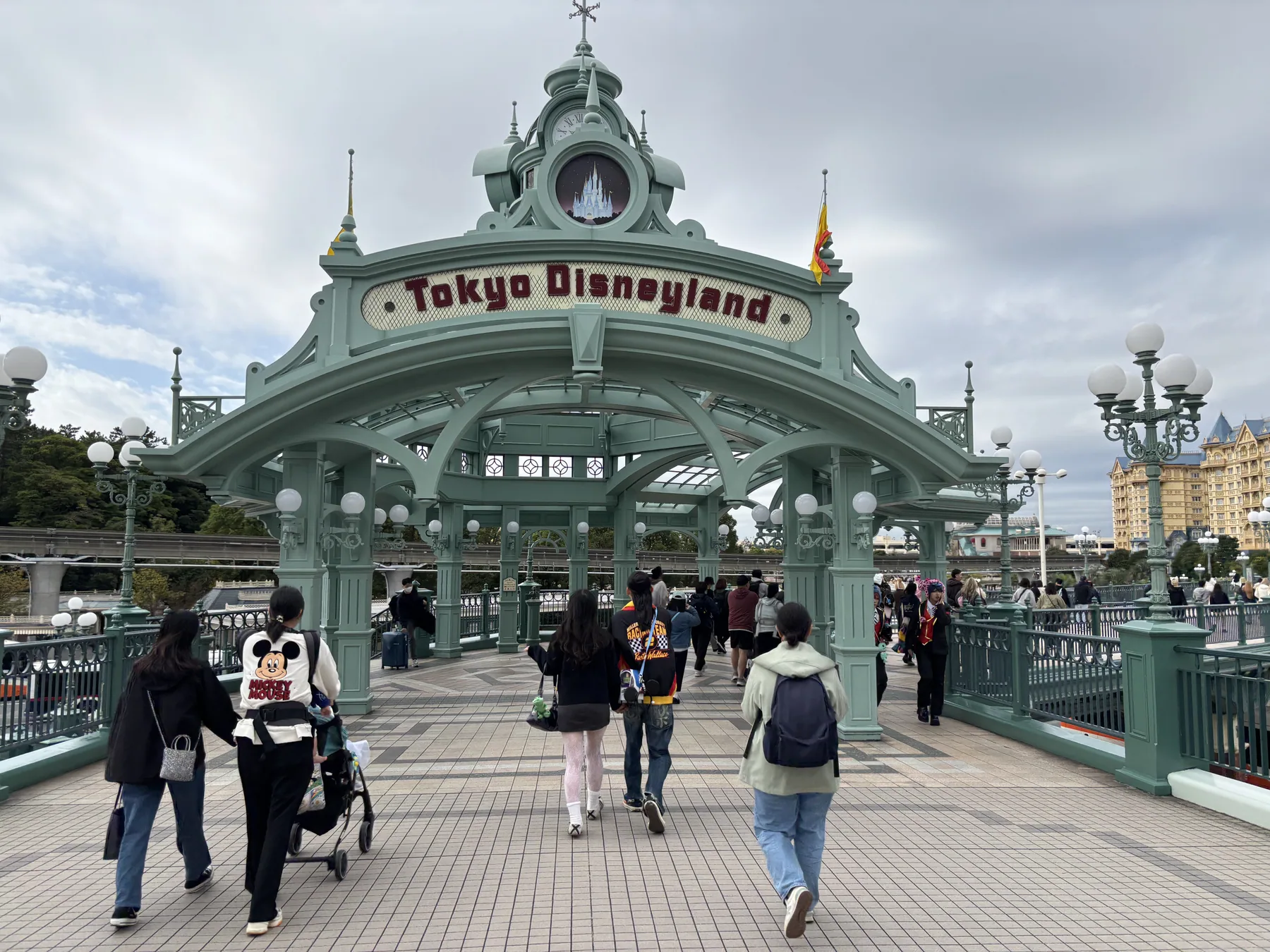

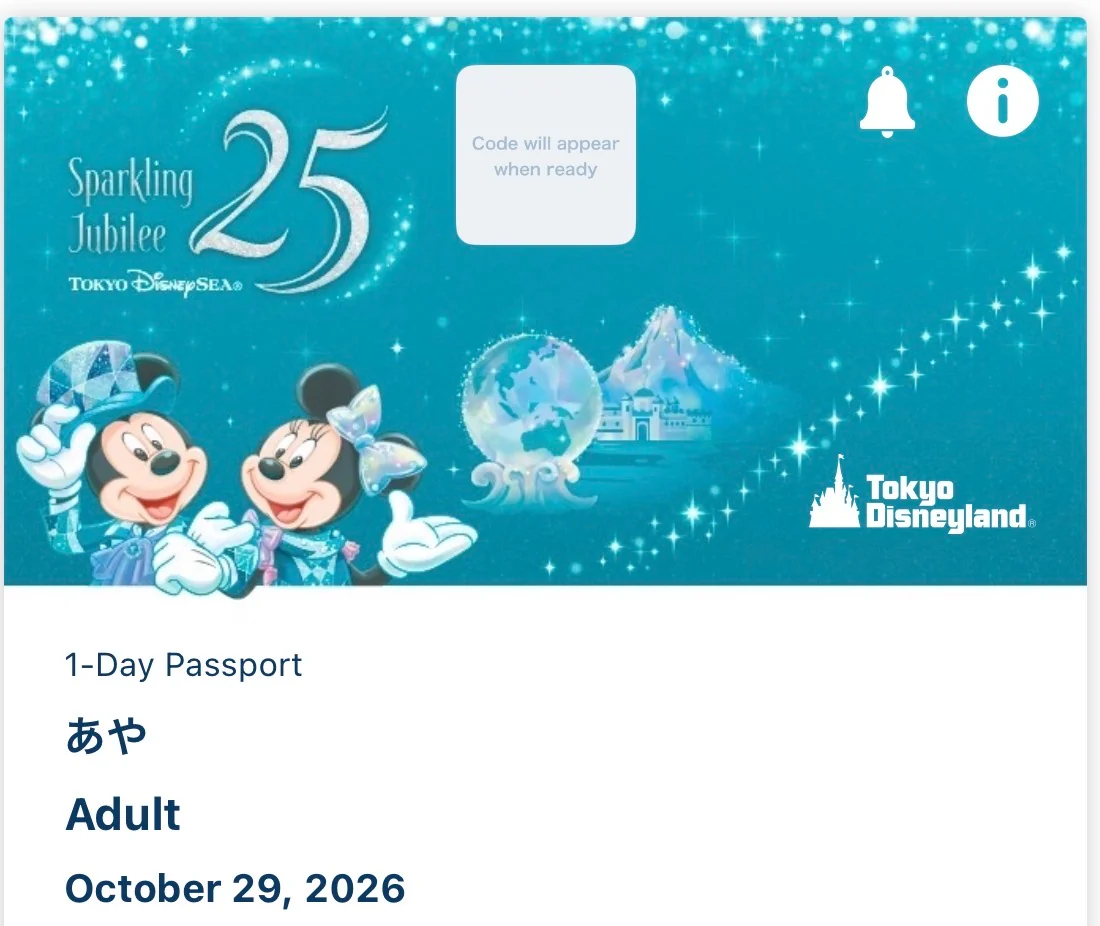
I used the English Tokyo Disney Resort App in September 2026 to document the process from account setup and ticket purchase to group sharing. Tokyo Disneyland relies heavily on this official app: use it to buy and display your dated Park ticket, share plans with your group, check wait times, and—after everyone has entered the Park—purchase or request eligible experiences. The old Disney FASTPASS system is not the system used today.

Eligible attractions, prices, sales periods, and app menus can change. I recommend treating this as a process guide and confirming the live list in the official app on your visit date.
1. What replaced Disney FASTPASS?
If someone tells you to “get a FastPass,” they may be using the old name informally. Tokyo Disney Resort’s current services have different rules and are not interchangeable. The temporary Tokyo Disney Resort 40th Anniversary Priority Pass also ended on August 31, 2026, according to the resort’s official FAQ.
| Service | Cost | What it does |
|---|---|---|
| Disney Premier Access | Paid per person, per experience | Lets you select a designated time for an eligible attraction, parade, or show; attraction access generally uses a reduced-wait entrance. |
| Standby Pass | Free | Lets you join the queue for a designated venue during an assigned return period. It is not a promise of a short wait. |
| Entry Request | Free | A request for access to selected shows, parades, or greetings. A successful result is required when the experience is operating under this system. |
| Regular standby line | Included with admission | Join the ordinary queue when it is available; the app shows current wait estimates. |
Do not buy an unofficial “FastPass” from a third party. Use only the options displayed for your valid Park ticket in the official app.
2. Install the app and create a MyDisney Account
I completed the download and account setup before the trip. The screenshots below are from the English interface I used in September 2026; wording and button positions may change after an app update.
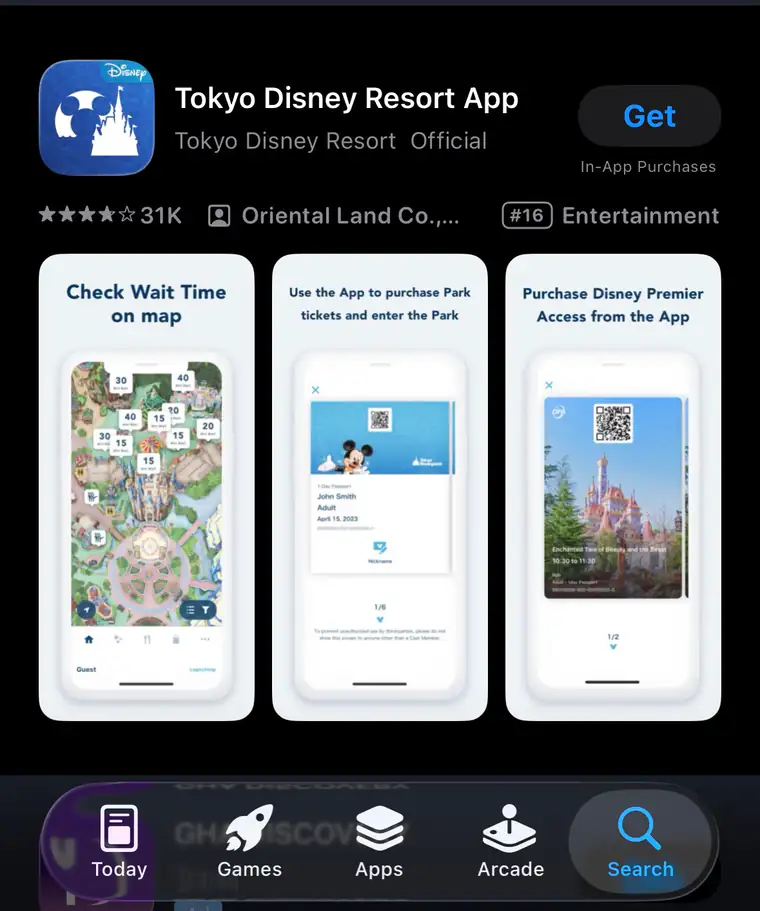
Step 1: Install the official app
Search for Tokyo Disney Resort App in the App Store or Google Play. Confirm the blue castle icon and the official developer before tapping Get or Install.
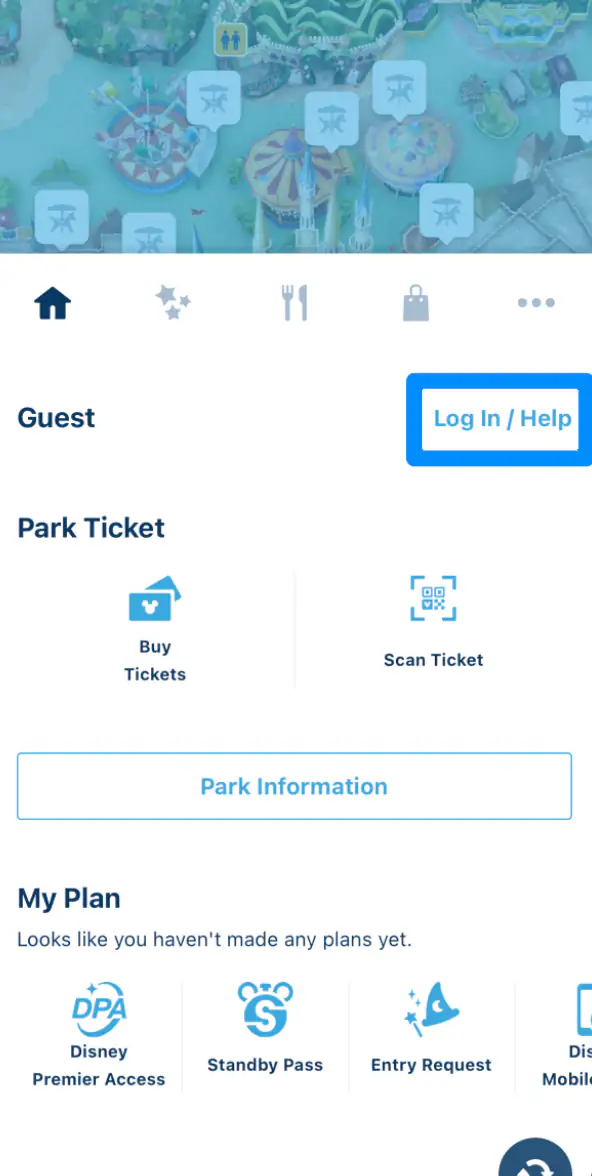
Step 2: Tap “Log In / Help”
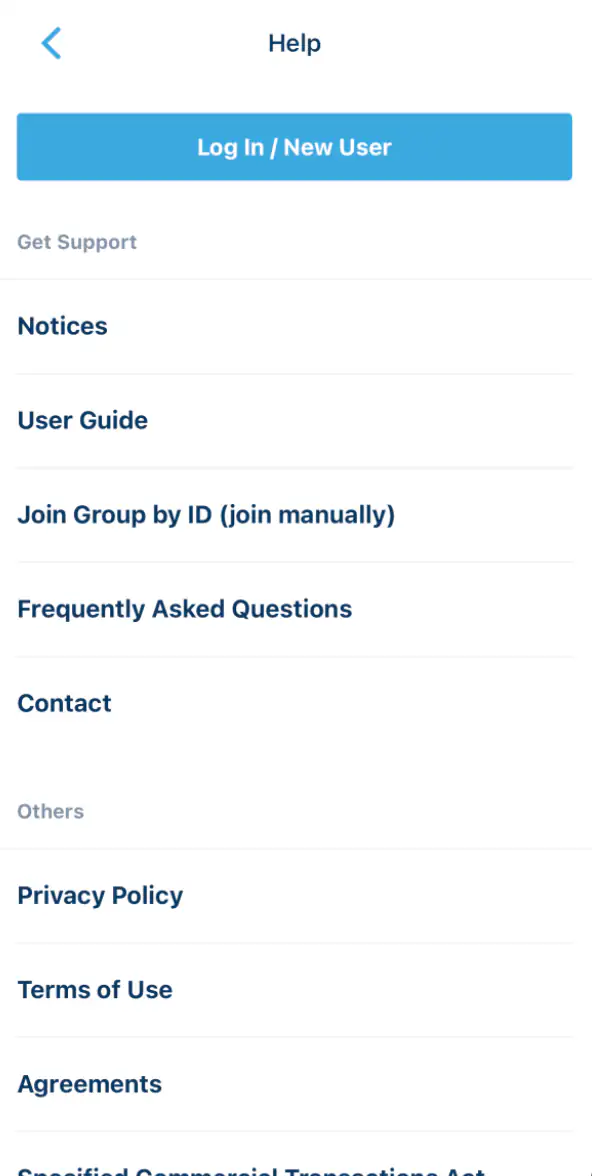
Step 3: Choose “Log In / New User”
If you already have a MyDisney Account, use the same account. Otherwise, choose the new-user flow.
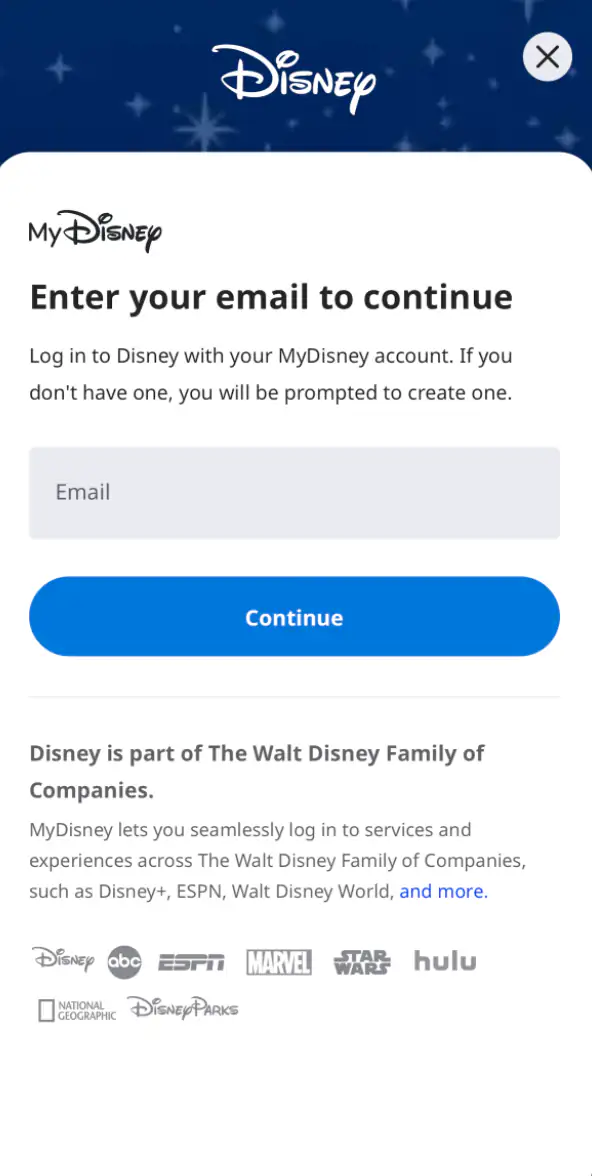
Step 4: Register your email address, name, and password
Enter the email address you can access during the trip, then complete the account form with your first name, last name, and password. Verify the address if Disney sends a confirmation message.
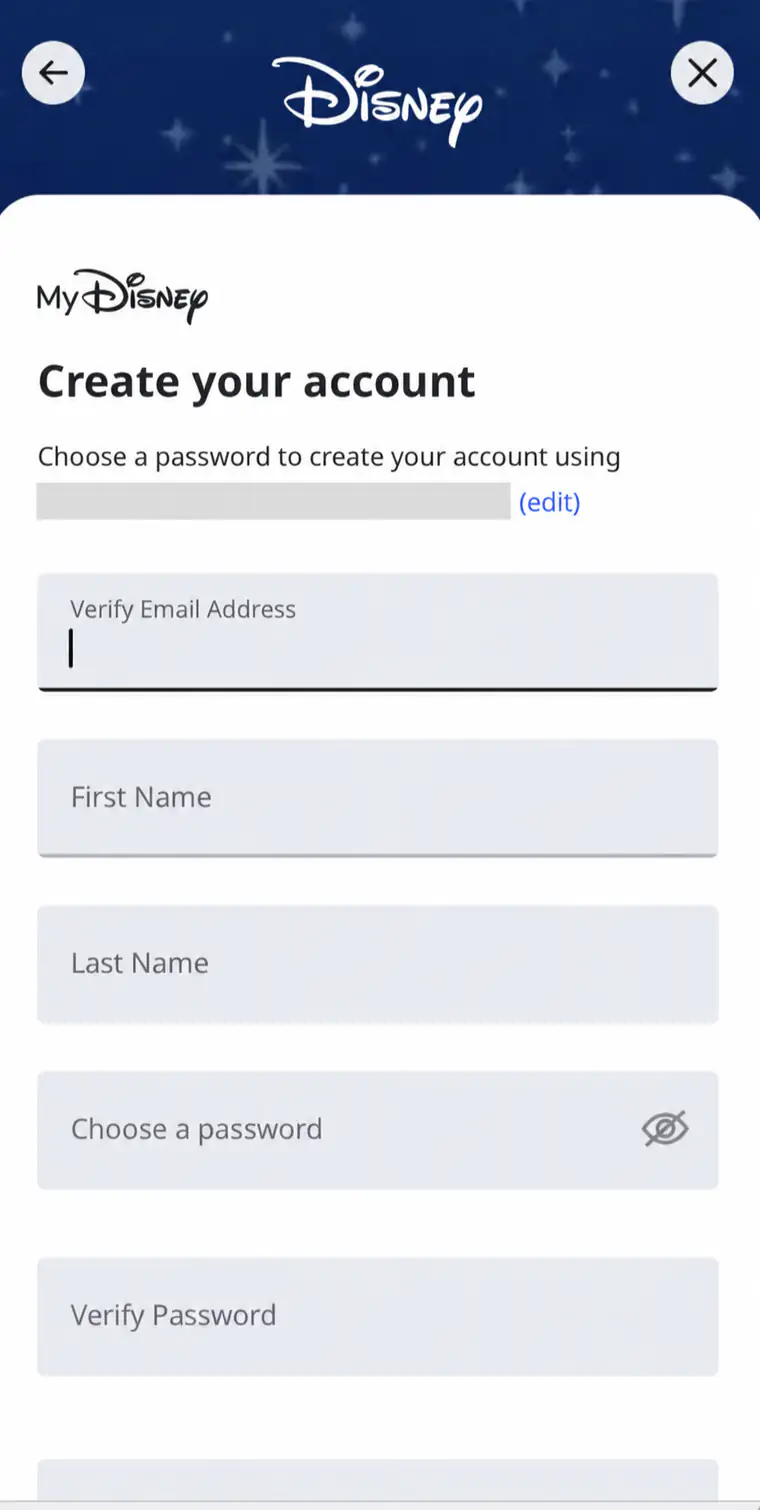
Step 5: Confirm your account and choose a character icon
After registration, your name appears on the home screen. Tap the profile icon if you want to choose a Disney character for the account.
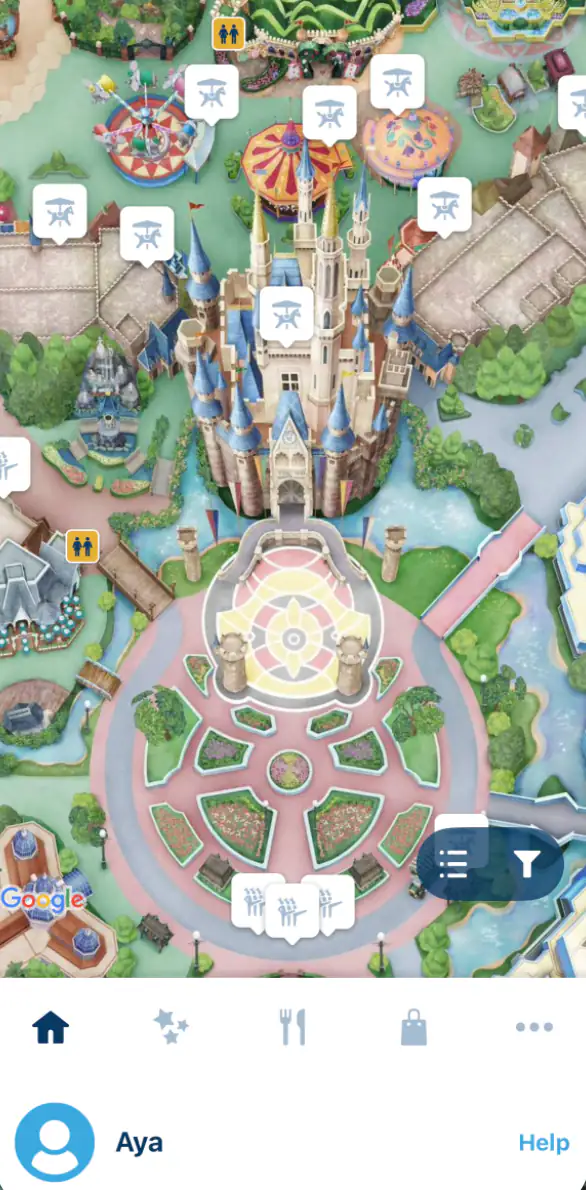
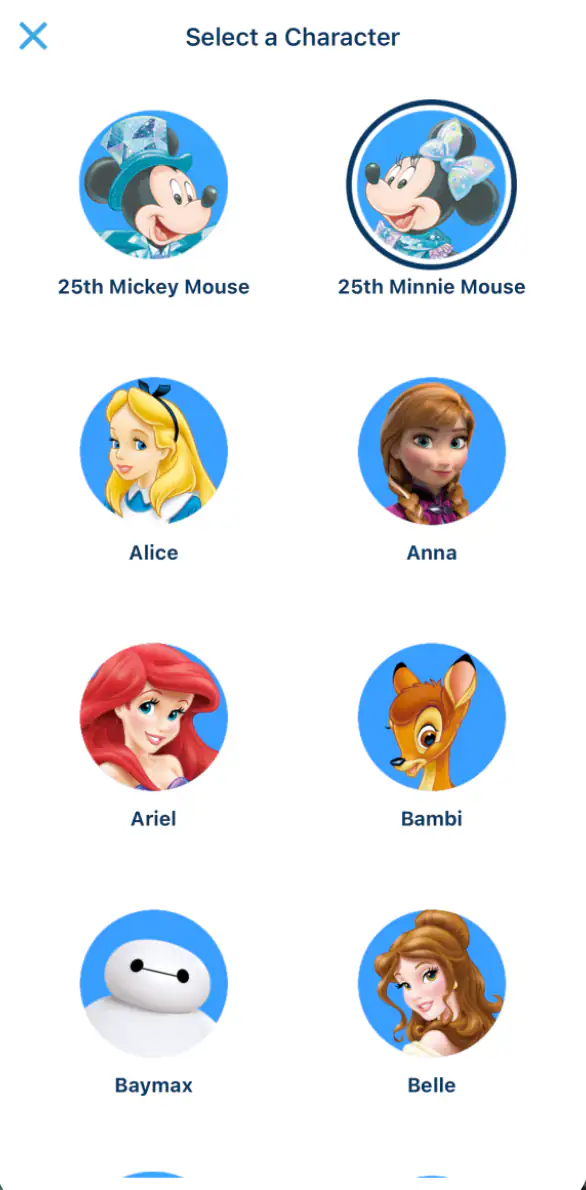
Confirm that you can sign in, then prepare mobile data and a power bank. The official app is designed for compatible smartphones, and you will use it repeatedly inside the Park.
3. How to buy Park tickets in the app
These screenshots show my ticket-purchase example. Ticket names, prices, dates, and accepted payment methods can change, so use the live details displayed during your own checkout.
Step 6: Tap “Buy Tickets”
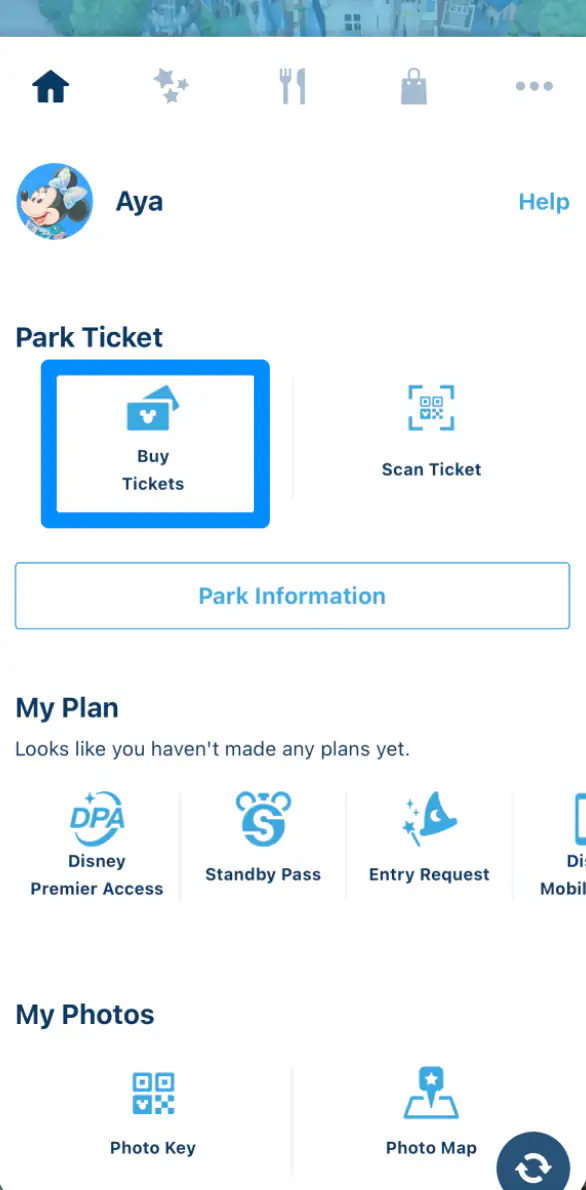
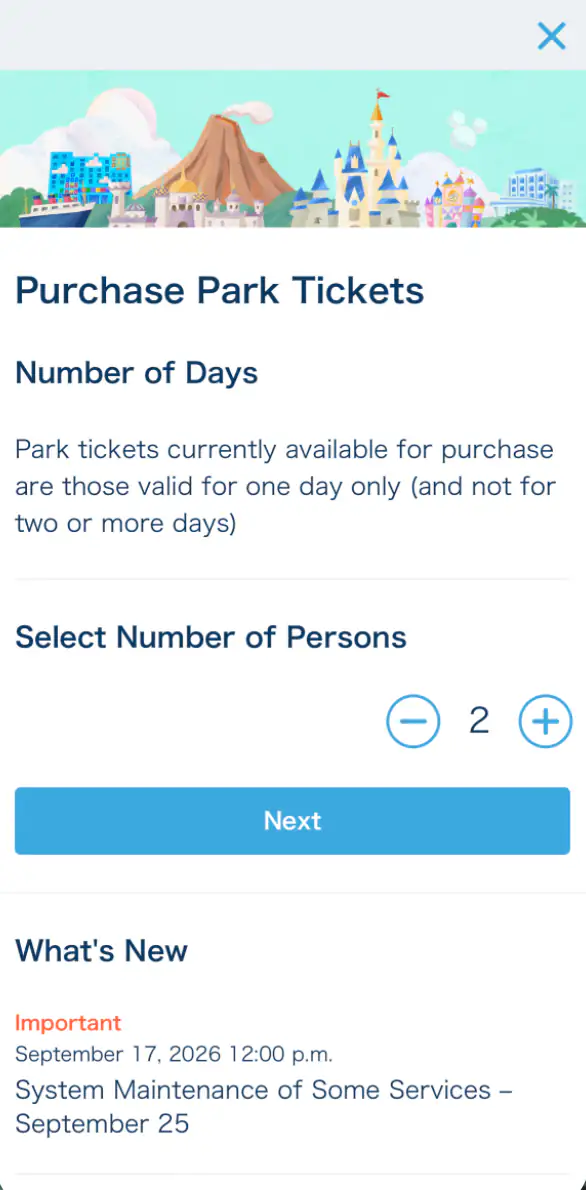
Step 7: Select the total number of guests
Count everyone who needs a Park ticket. Official ticket categories are Adult (18+), Junior (12–17), and Child (4–11). Children ages 3 and under enter free and should not be counted as ticket holders.
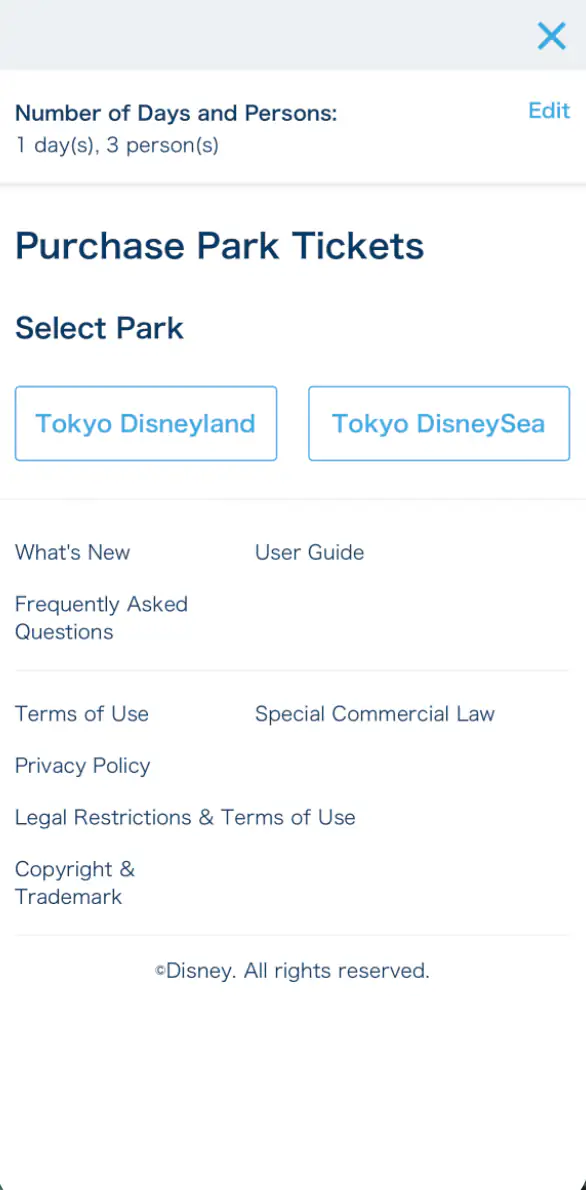
Step 8: Choose Tokyo Disneyland or Tokyo DisneySea
Check this carefully: a fixed-date ticket is for the selected Park and date.
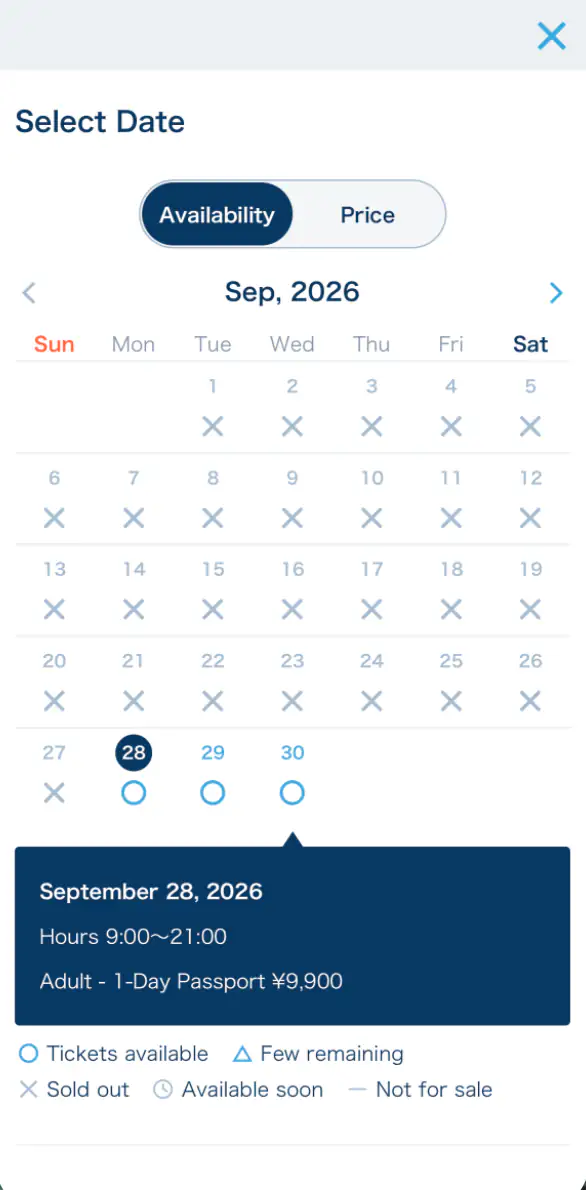
Step 9: Choose the visit date
Same-day purchase may be possible while tickets remain available, but sales stop when capacity is reached. Japanese holidays, weekends, and special-event dates can sell out, so check the official ticket-availability guidance and the live calendar in the app before traveling. Buying in advance is the safer choice.
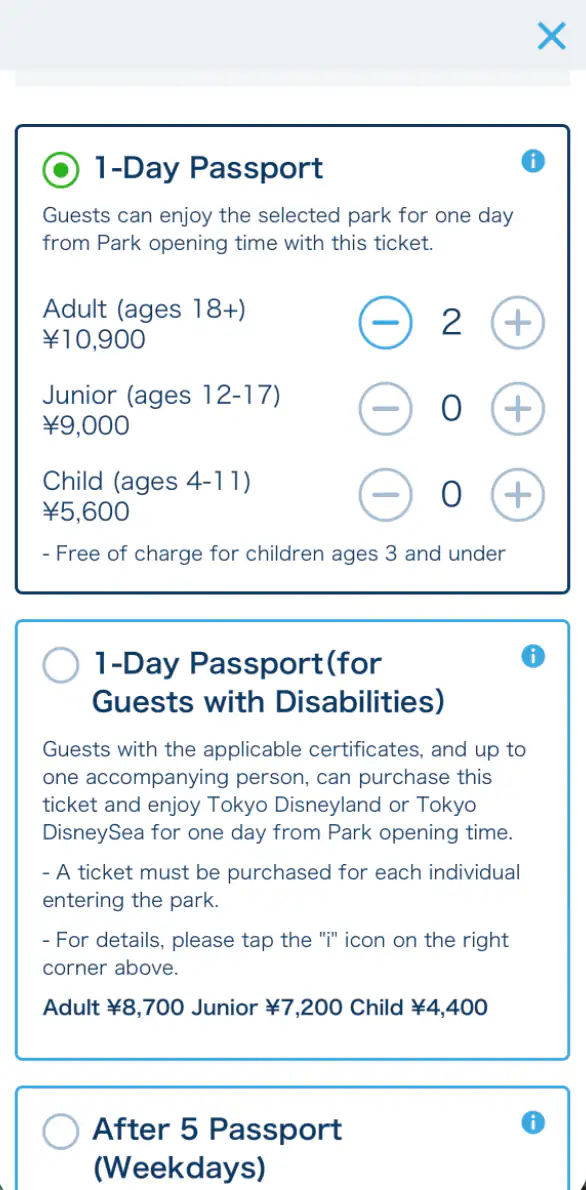
Step 10: Select the ticket type and age categories, then add to cart
Choose the product shown for your intended entry time, then set the number of Adult, Junior, and Child tickets. Read the conditions, tick the acknowledgement, and tap Add to Cart.
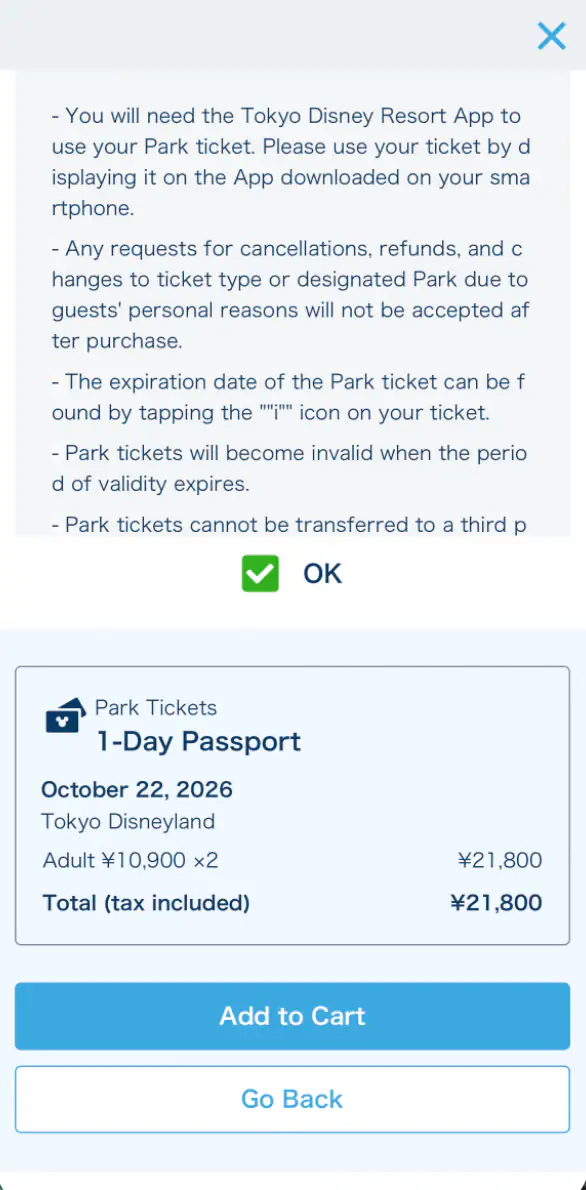
Step 11: Enter your email, address, name, and phone number
Use an email address you can check during the trip. Complete the home-address and contact-person screens exactly as requested. If a field asks for a full name or pronunciation on one line, separate the given and family names with a single normal half-width space.
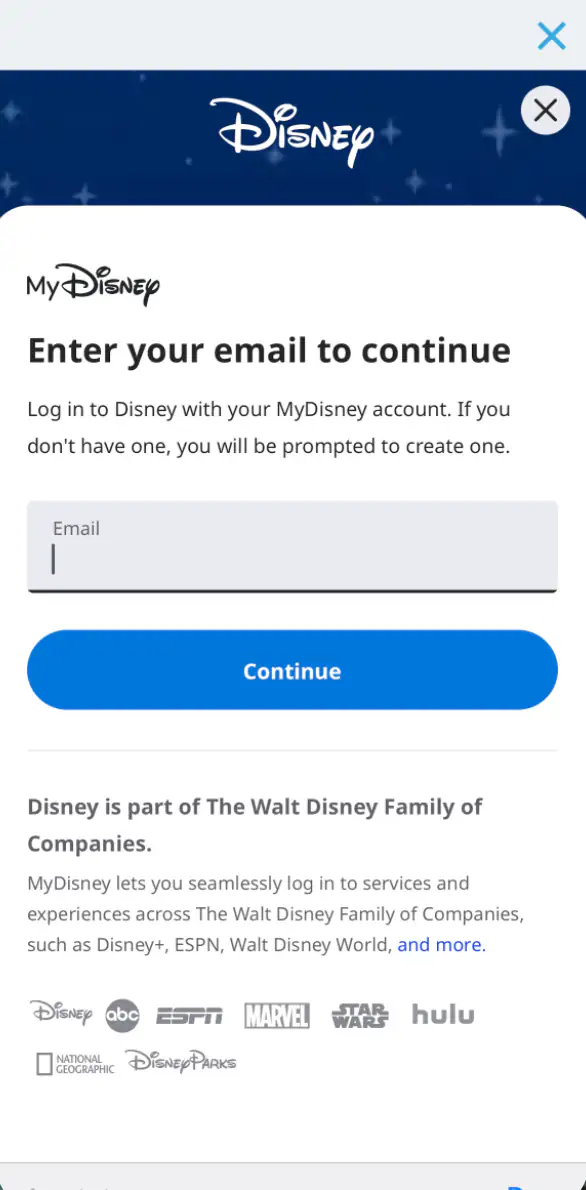
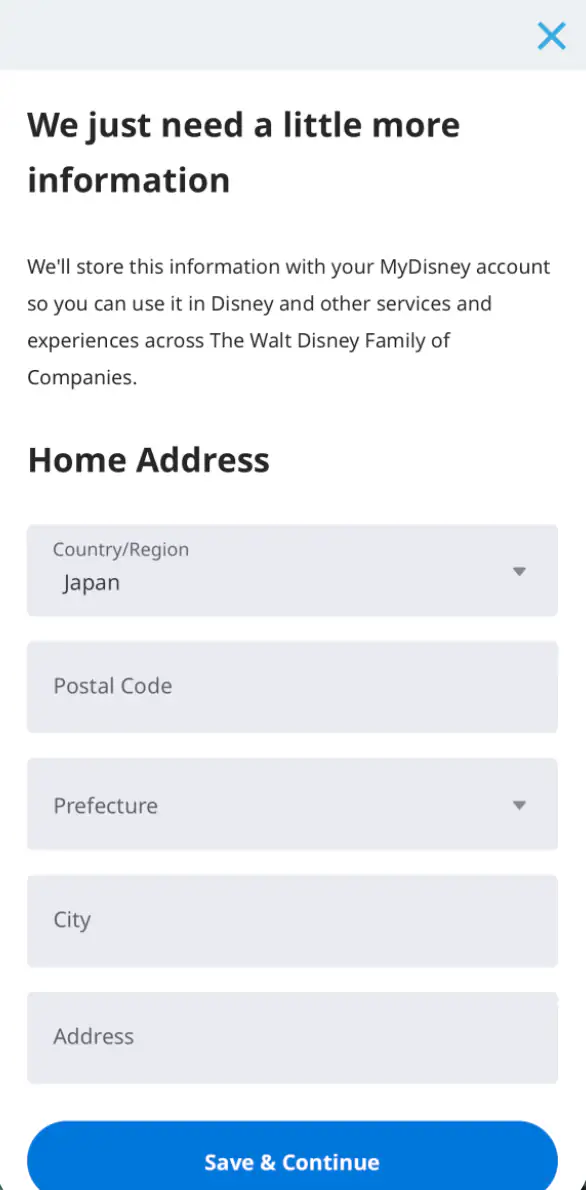
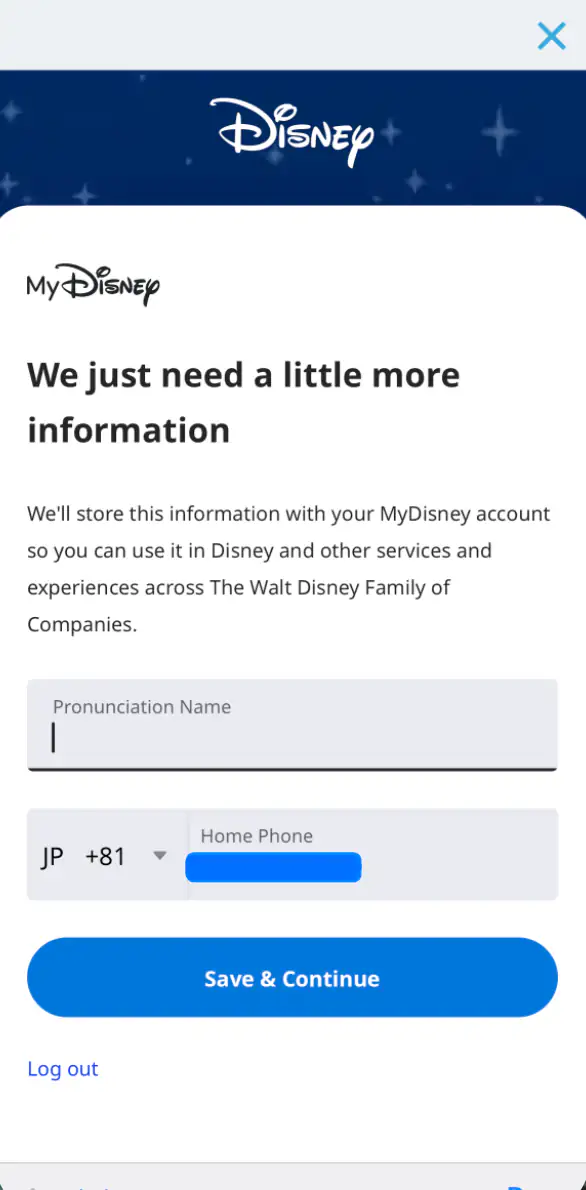
Step 12: Choose and enter the payment method
Select an available payment option and complete any card verification requested by your bank. Keep a backup card ready in case the first payment is declined.
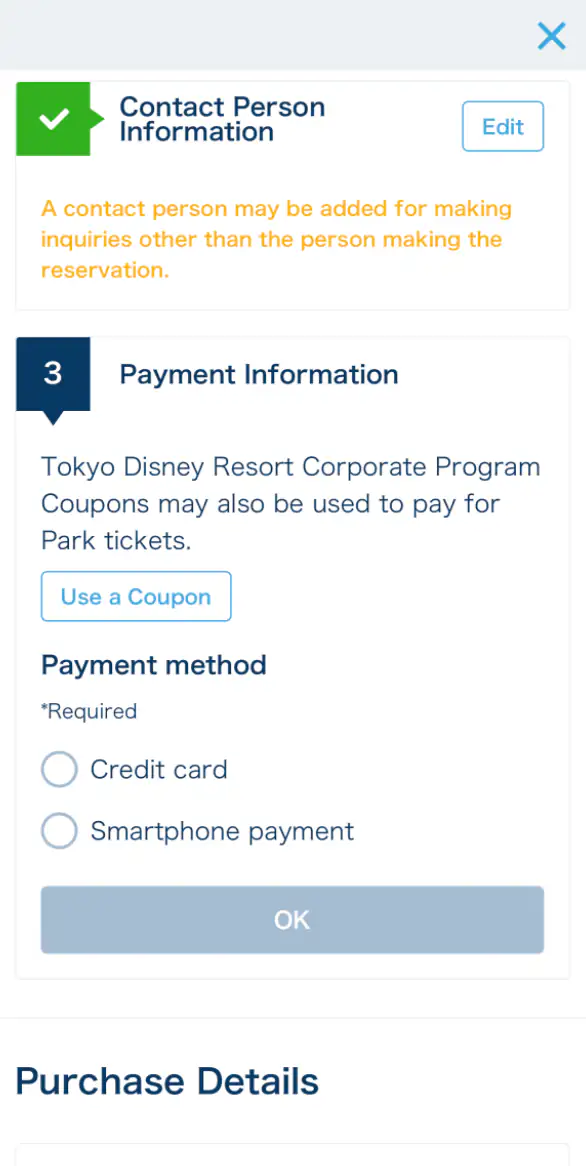
Step 13: Review, agree, and complete the purchase
Confirm the Park, date, age category, quantity, and total before paying. Check the required agreement and tap the final purchase button only when everything is correct.
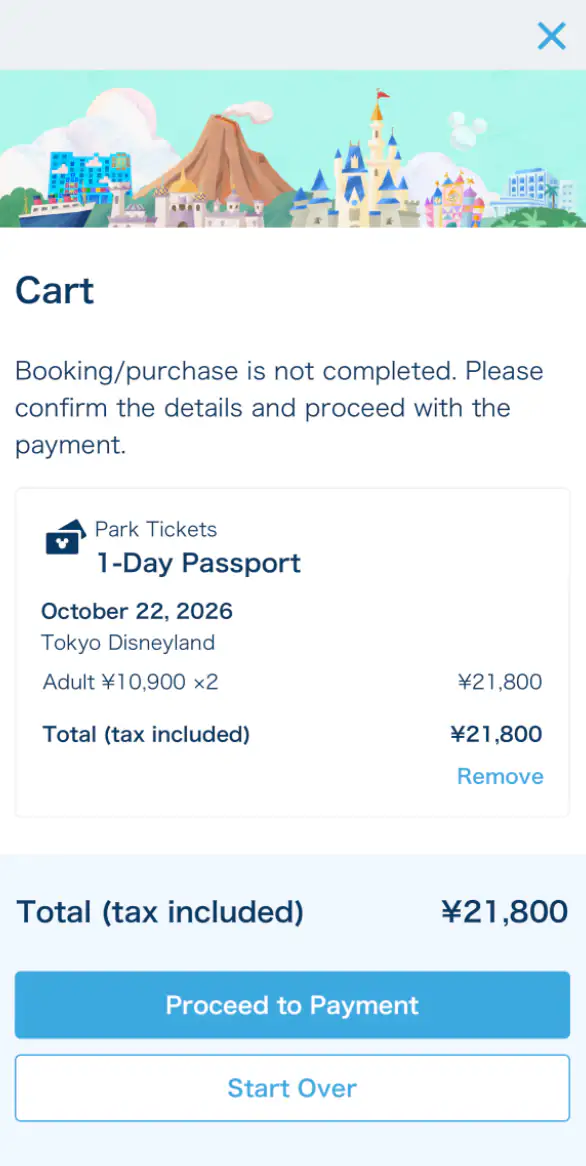
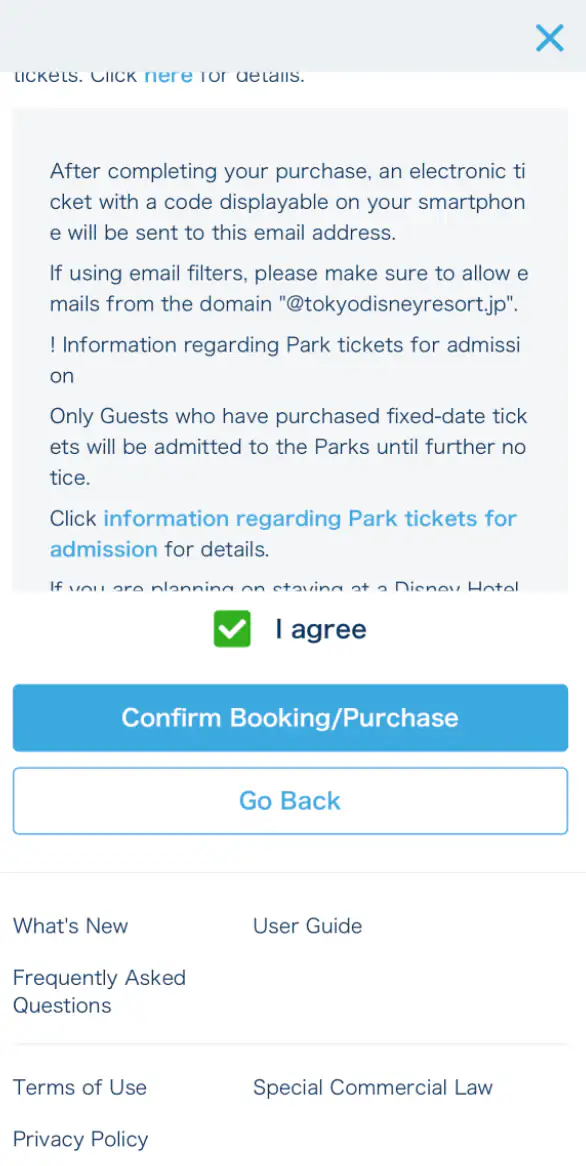
The official policy does not accept cancellation or refund requests simply because a guest’s plans changed. Ticket booths are currently closed, and tickets can sell out.
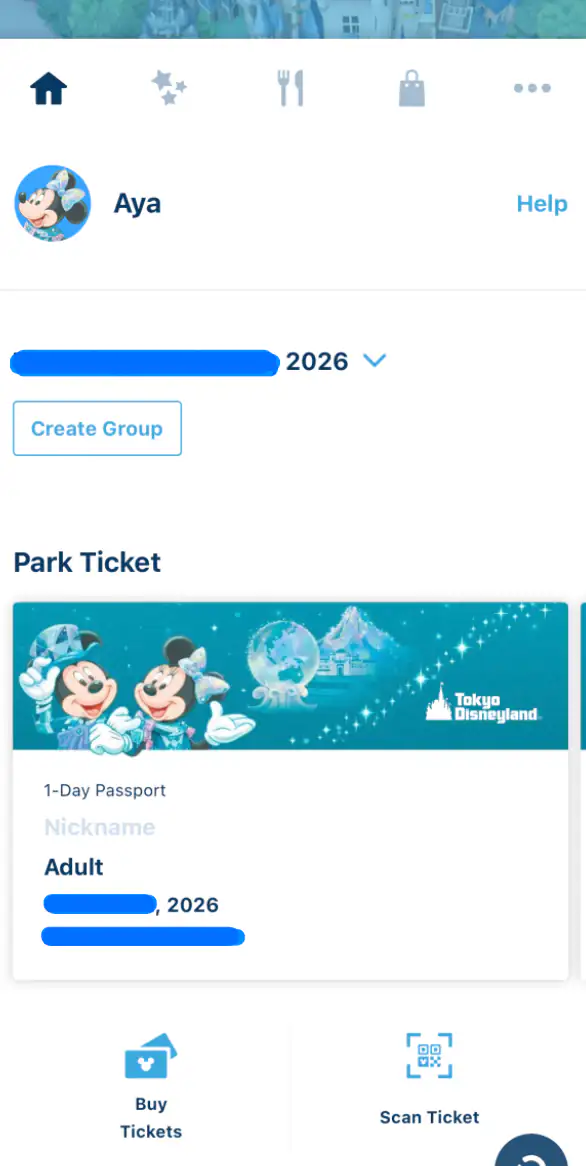
Step 14: Confirm the ticket on the home screen
Return to the home tab and select your visit date. The ticket should appear under Park Ticket. On the visit date, tap it to display the admission code and scan that code at the entrance gate. The official guide says the code becomes available from 12:00 midnight on the day of your visit.
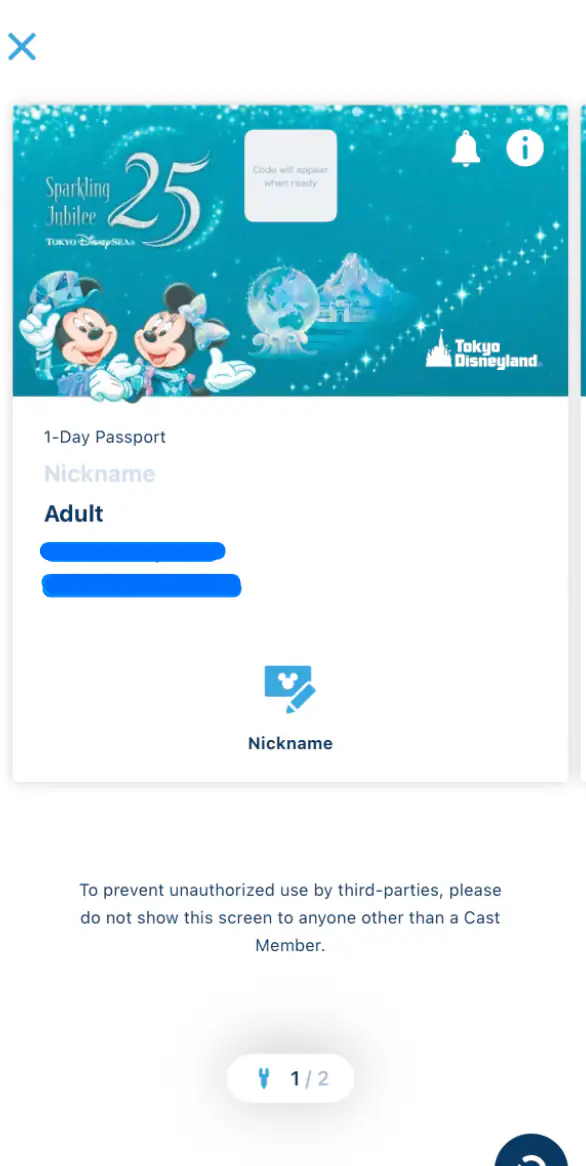
4. How to share tickets with family or friends
I created an app group so family members could see the shared Park tickets and plan details. I recommend setting up the group before your visit: after everyone enters the Park, one person can select the group members’ tickets together when purchasing Disney Premier Access, submitting an Entry Request, or obtaining a Standby Pass. This makes it easier to keep the party on the same return time or plan. Each person still needs their own valid ticket, and joining a group does not guarantee availability. The invited person should install the official app, create or sign in to a MyDisney Account, and open the invitation on the phone they will use.
I recommend connecting everyone before reaching the entrance and confirming that every member and ticket is visible in advance. Once inside, a representative can select all participating tickets together for DPA, Entry Request, or Standby Pass instead of handling each phone separately.
Step 1: Tap “Create Group”
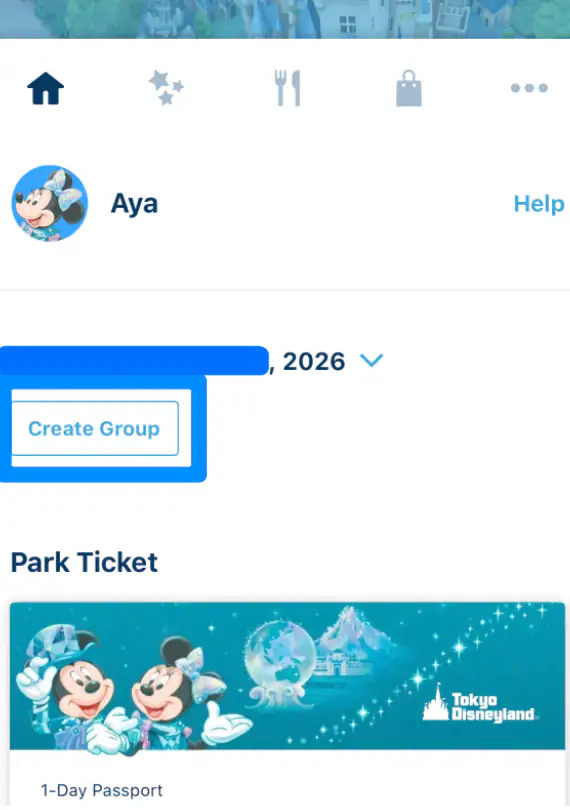
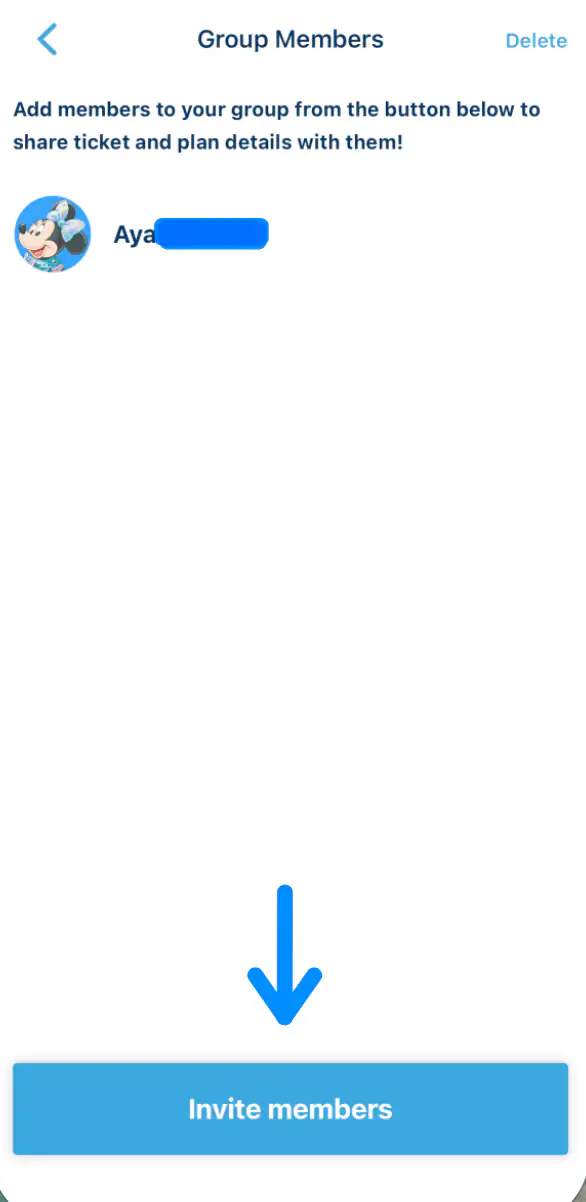
Step 2: Tap “Invite members” and send the link
Use the phone’s share menu to send the invitation URL by email, LINE, AirDrop, or another available method.
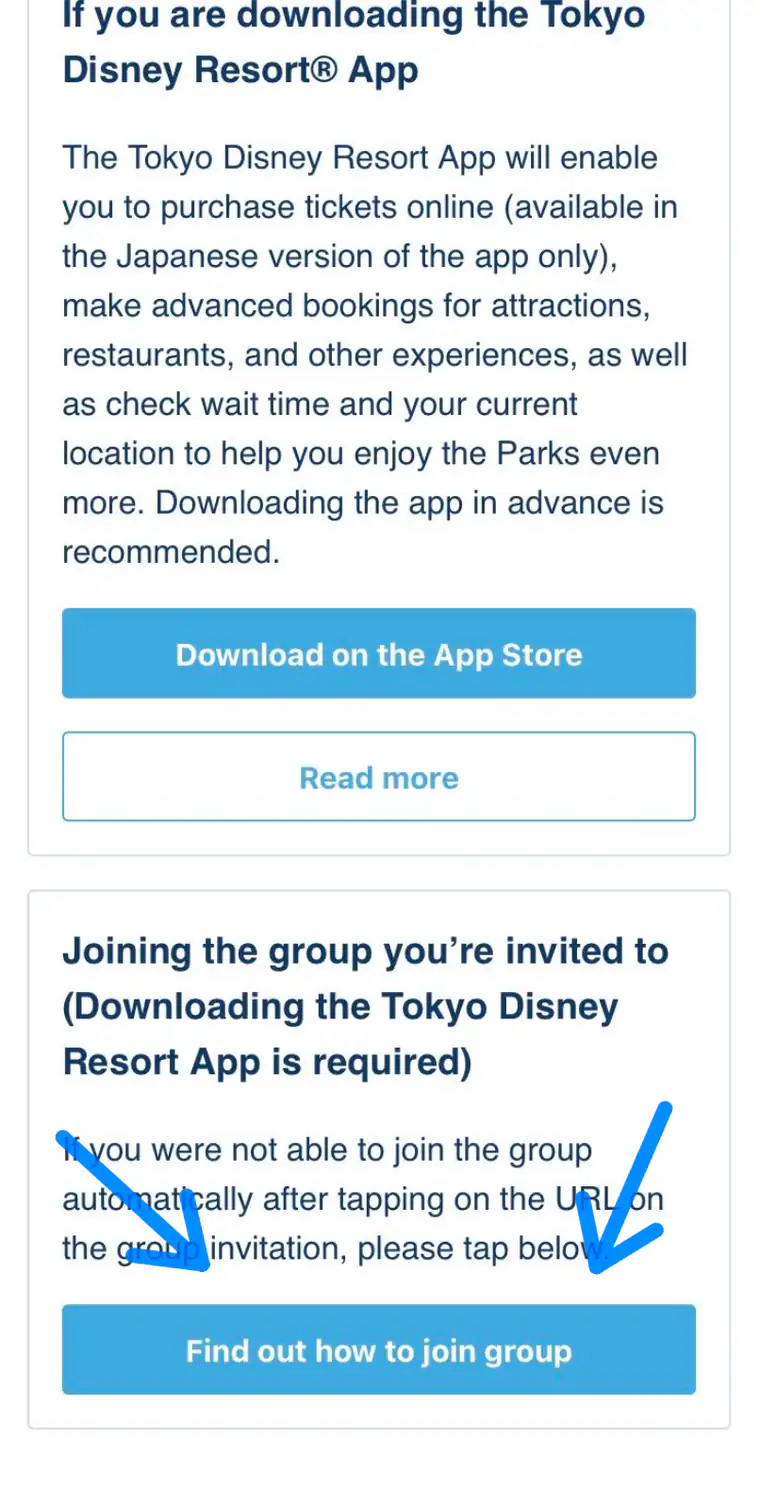
Step 3: Open the invitation on the other person’s phone
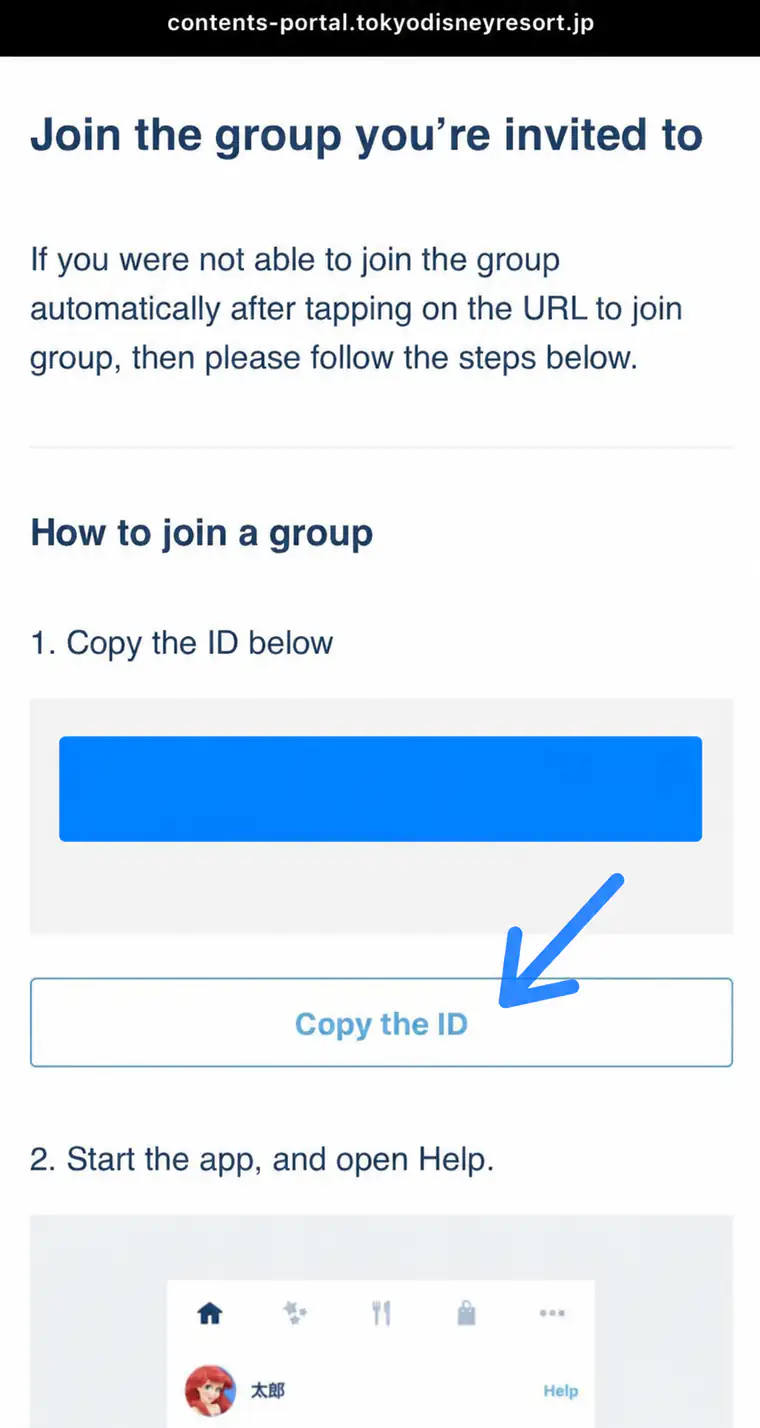
Normally, tapping the URL should open the app and join the group. If that does not happen automatically, tap Find out how to join group on the invitation page.
Step 4: Copy the group ID
Tap Copy the ID. Treat this ID and the invitation URL as private: send them only to the people joining your party.
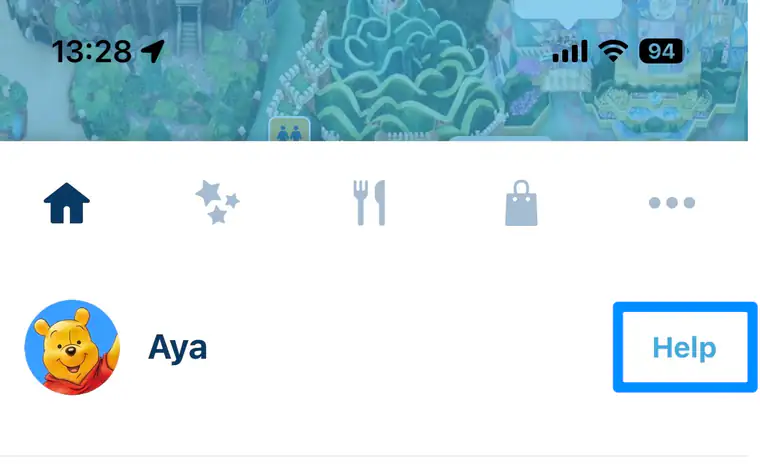
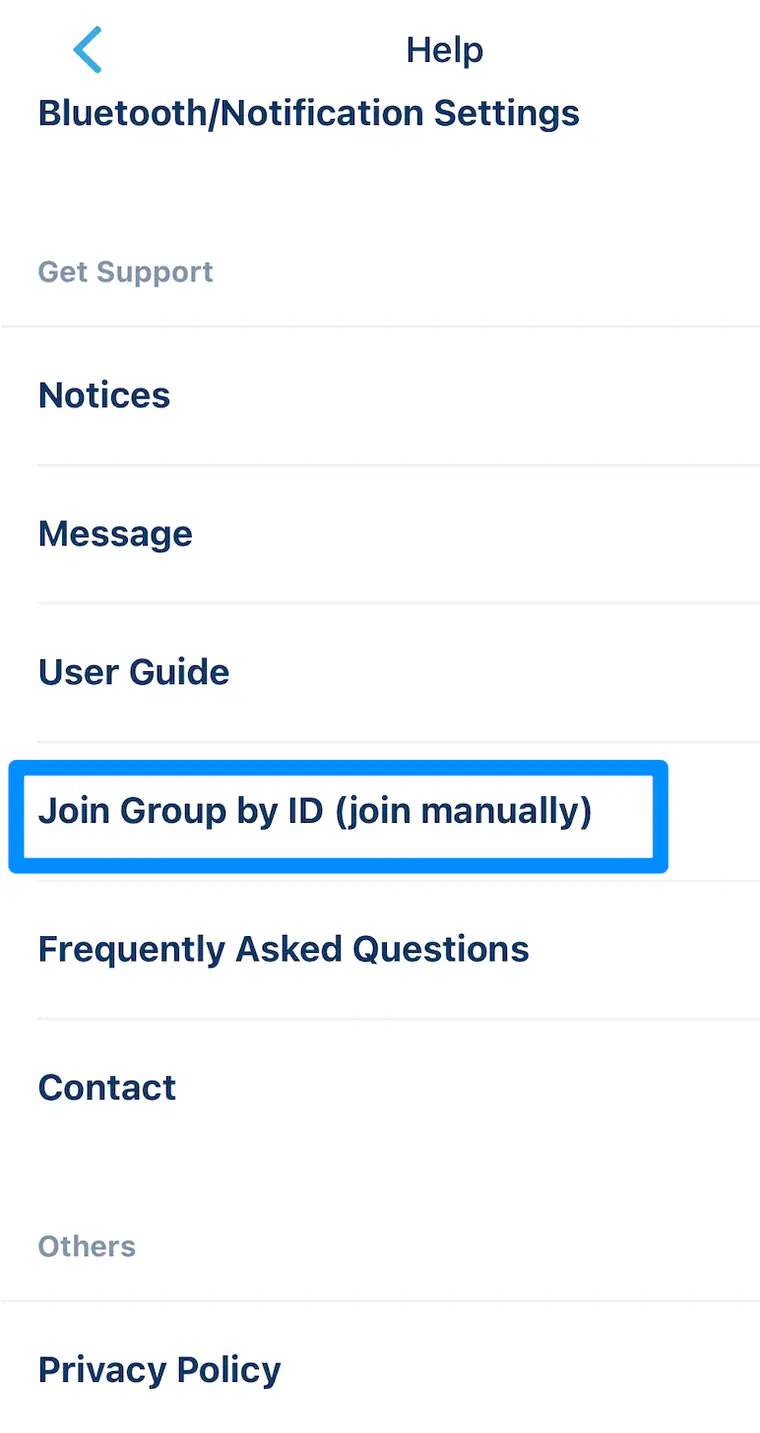
Step 5: In the app, open Help → Join Group by ID
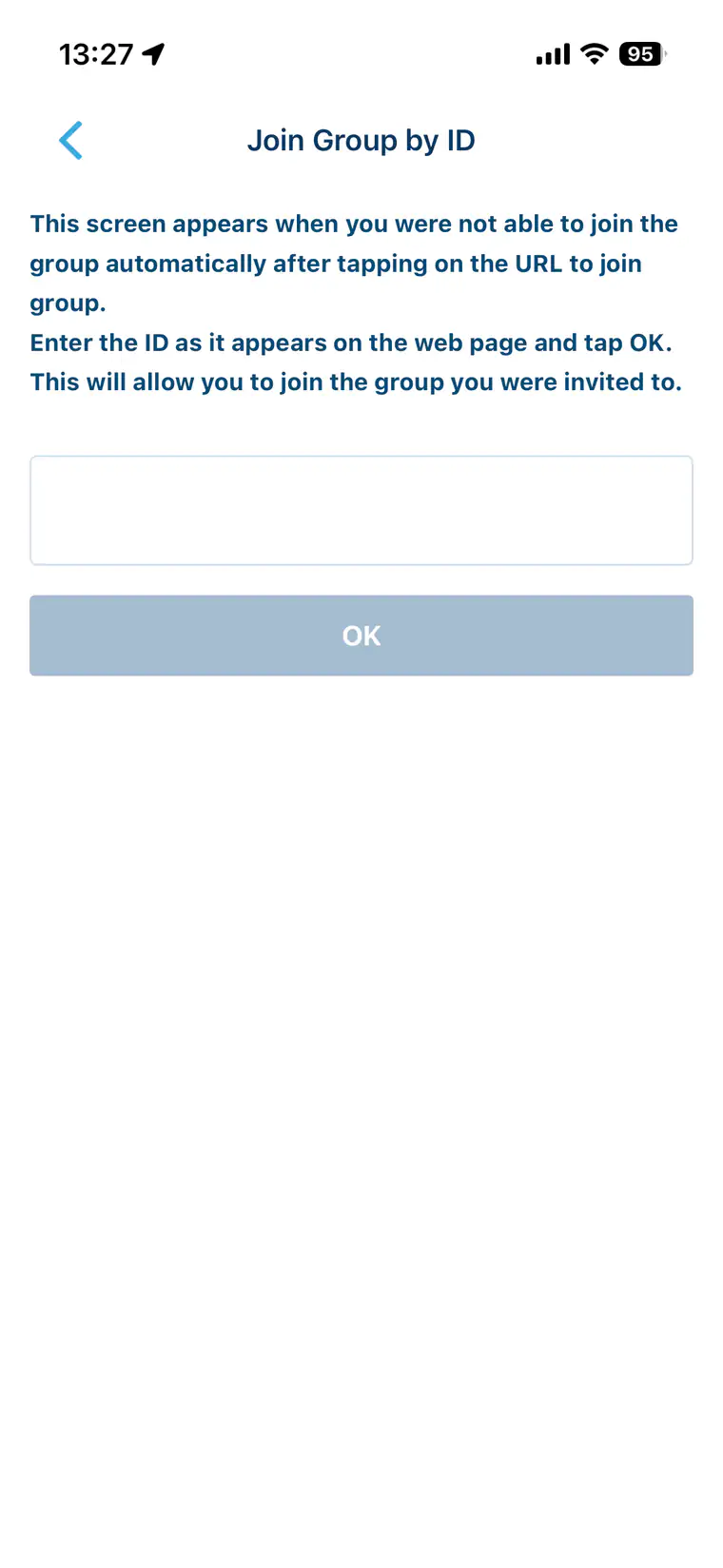
On the invited person’s app, tap Help, choose Join Group by ID (join manually), paste the copied ID exactly, and tap OK.
Step 6: Confirm the member and shared ticket
The added member’s character icon appears beneath the visit date, and the group’s tickets and plan details can be viewed by members.
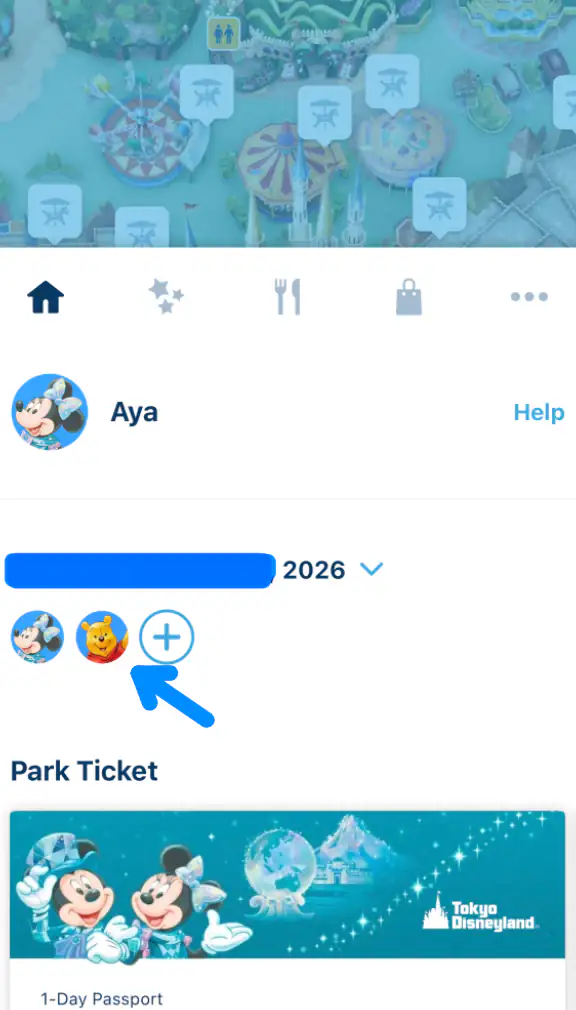
A group can be created only when a ticket or plan is displayed in the app, and one person can join only one group for that day. At admission, every guest still needs a valid ticket and must be present when their code is scanned.
5. What to do on Park day
The former Disney FASTPASS service is no longer offered. Its paid time-saving alternative is Disney Premier Access (DPA): after scanning your Park ticket and entering, open the app to purchase an available time for an eligible attraction, parade, or show. DPA cannot be purchased before admission or from outside the Park, and limited quantities can sell out. Standby Pass and Entry Request also become available only after the selected Park ticket has been used for admission. Jamboree Mickey! Let’s Dance! uses Entry Request, so you must be inside Tokyo Disneyland before you can submit the lottery-style request.
I recommend opening the app as soon as your party enters the Park if there is a Disney Premier Access attraction you really want or an Entry Request lottery you do not want to miss. DPA times and Entry Request availability are limited, so waiting until later may leave fewer choices—or none at all. If you created an app group in advance, one representative can select every participating member’s ticket and complete the request together.
- 1Open the app before reaching security
Select your visit date and confirm that every required ticket is visible. The ticket code becomes available from midnight on the visit date.
- 2Scan each ticket at the entrance
Keep the screen bright and move through only when directed. The rest of your party should be present.
- 3Once inside, open “My Plan”
Check the day’s availability for Disney Premier Access, Standby Pass, and Entry Request. These services generally require the selected tickets to have been used for Park entry.
- 4Select every person who will participate
Before confirming, make sure all eligible tickets in your party are selected. One entitlement is needed for each participating guest with a ticket.
- 5Check for time conflicts
Compare return periods with restaurant bookings, shows, and other plans. Do not assume the app will solve every overlap for you.
- 6Return during the displayed period
Open the item in “My Plan,” tap the option to display its code when it becomes available, and scan it at the designated entrance.
6. How Disney Premier Access works
Disney Premier Access (DPA) is the paid option for experiencing an eligible attraction with a reduced wait. It can also provide a designated admission time and viewing area for eligible parades or shows. It is separate from your Park ticket and can be purchased through the official app only after you have entered the Park.
Enter the Park first → open My Plan → tap Disney Premier Access → select every participating guest’s ticket → choose an available experience and time → pay in the app. If your whole party wants the same time, purchase everyone’s access together.
- 1After entry, tap “Disney Premier Access” in My Plan
Select the tickets for every person who will use it.
- 2Choose an available experience and time
Review the live price and the return period shown in the app.
- 3Pay in the app
Complete the purchase with an accepted credit, debit, or prepaid card. Guests without the app or an accepted card can ask about the current in-Park sales locations.
- 4Use the code at the stated entrance
Open the plan when your access window begins and scan the displayed code or Park tickets as instructed.
Quantities are limited and can sell out, so check the app soon after entering if DPA is important to your day. A purchase is valid only for the selected experience and designated period, and it cannot be shared or transferred. Check height and other participation rules before buying.
7. Free services: Standby Pass and Entry Request
Standby Pass
A Standby Pass controls when you may join a queue for an eligible attraction, shop, or other venue. It is free, but it does not reserve an immediate ride time and does not guarantee a short wait or admission. Some venues admit only Standby Pass holders during specified periods; the live app shows whether a pass is currently required.
In My Plan, choose Standby Pass, select the relevant category and all participating tickets, then choose an available venue. Return during the displayed period and show the code. Availability can reappear, so checking again later may help, but never plan your whole day around a possible release.
Entry Request
Entry Request is a free selection process for certain shows, parades, and character greetings. Select all participating tickets, choose an offered experience and time, and submit the request. A displayed return time means the request succeeded; an unsuccessful result means you cannot use that Entry Request entitlement for the experience, unless its operating method later changes.
Entry Request can generally be attempted only once per eligible venue per day, regardless of the result. It is not a first-come “FastPass,” and submitting earlier does not turn it into a guaranteed reservation.
8. Practical app tips that prevent a bad day
- Prioritize before entering. Decide which one or two experiences matter most so you can act calmly after the gate.
- Turn on notifications. Still set your own alarm 10–15 minutes before each return period.
- Watch the battery. Lower unnecessary screen use, but raise brightness before scanning a code.
- Keep a payment backup. A card that worked elsewhere may still fail an online verification step.
- Read the live app, not an old blog screenshot. Eligible venues and buttons change with operations, events, maintenance, and demand.
- Ask a Cast Member early. If a ticket is missing, the app cannot locate you, or payment fails, get help before a desired experience sells out.
9. Quick FAQ
Can I buy Disney Premier Access before entering Tokyo Disneyland?
No. Disney Premier Access can be purchased only after the relevant Park ticket has been used to enter the Park. You can prepare your account, group, tickets, payment method, and priorities in advance, then buy an available DPA in the app after admission.
Is Disney Premier Access included with admission?
No. It is an optional paid service, charged per eligible guest and experience. Your Park ticket is still required.
Is Standby Pass a free FastPass?
No. It lets you enter a designated venue’s queue during a return period. The wait may still be substantial, and admission is not guaranteed.
What happened to the 40th Anniversary Priority Pass?
Tokyo Disney Resort’s official FAQ states that it ended on August 31, 2026. Older guides that tell you to obtain it are now outdated.
Can one person manage the whole family?
Yes, one adult can select the group’s linked tickets, but every participating guest needs their own valid ticket and entitlement. Having another adult join the app group provides a useful backup.
What if I do not have a smartphone?
Bring your ticket code and speak with a Cast Member at the relevant venue. The official guidance provides in-Park assistance, although available methods depend on the service.
I wrote this editorial guide independently; it is not affiliated with or endorsed by Tokyo Disney Resort or The Walt Disney Company. I captured the instructional app screenshots to help readers identify the official app and relevant controls, but the live interface may differ. I removed my personal email and invitation-ID information from two screenshots. I checked the procedures against the official Tokyo Disney Resort App guide, online ticket purchase guide, ticket-use guide, ticket and age-category list, group guide, Disney Premier Access guide, Standby Pass guide, Entry Request guide, and the official Jamboree Mickey! Let’s Dance! page. I use the service names only to identify the official products discussed. Always confirm current availability, prices, eligible experiences, and conditions in the official app.