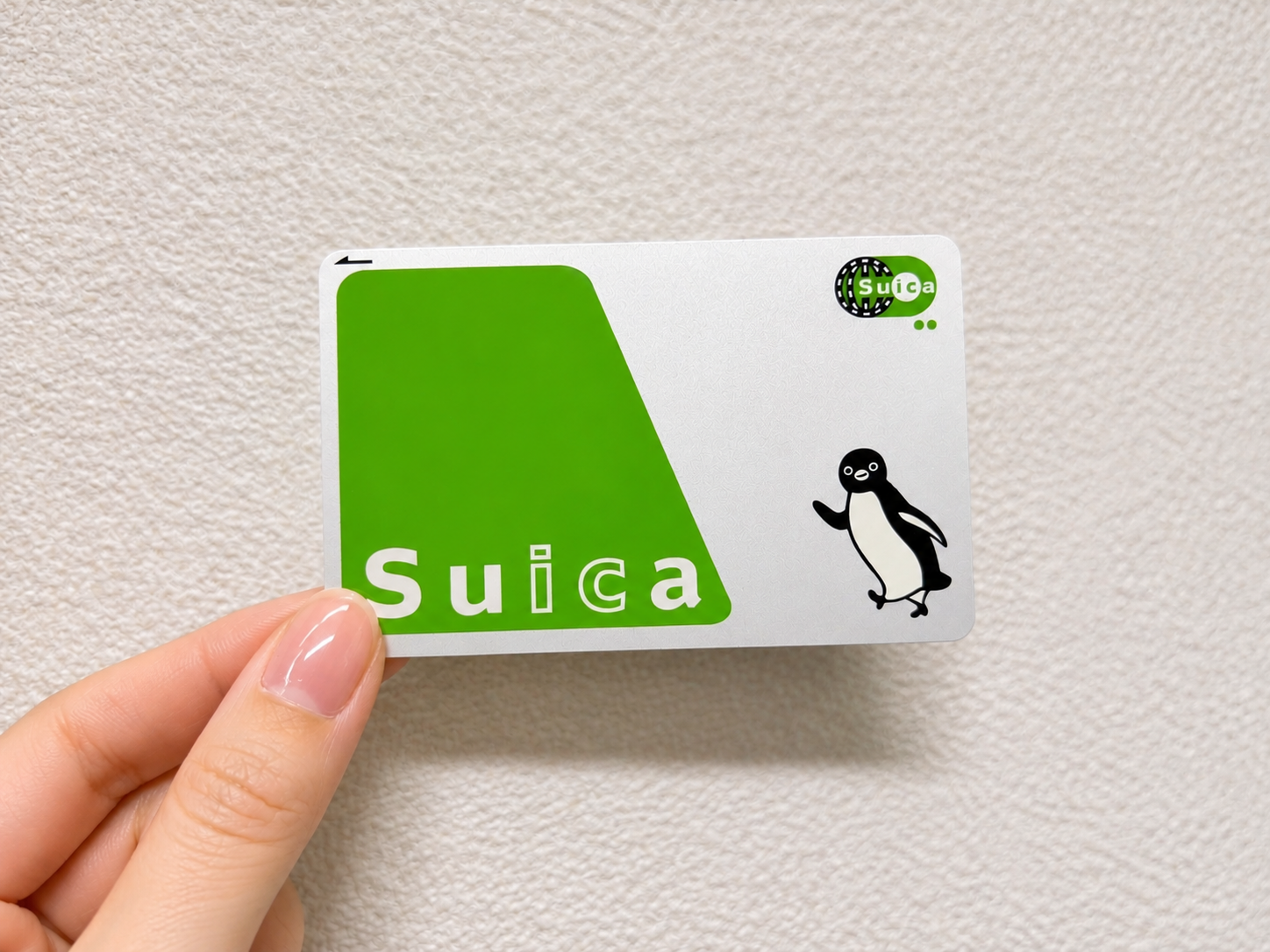
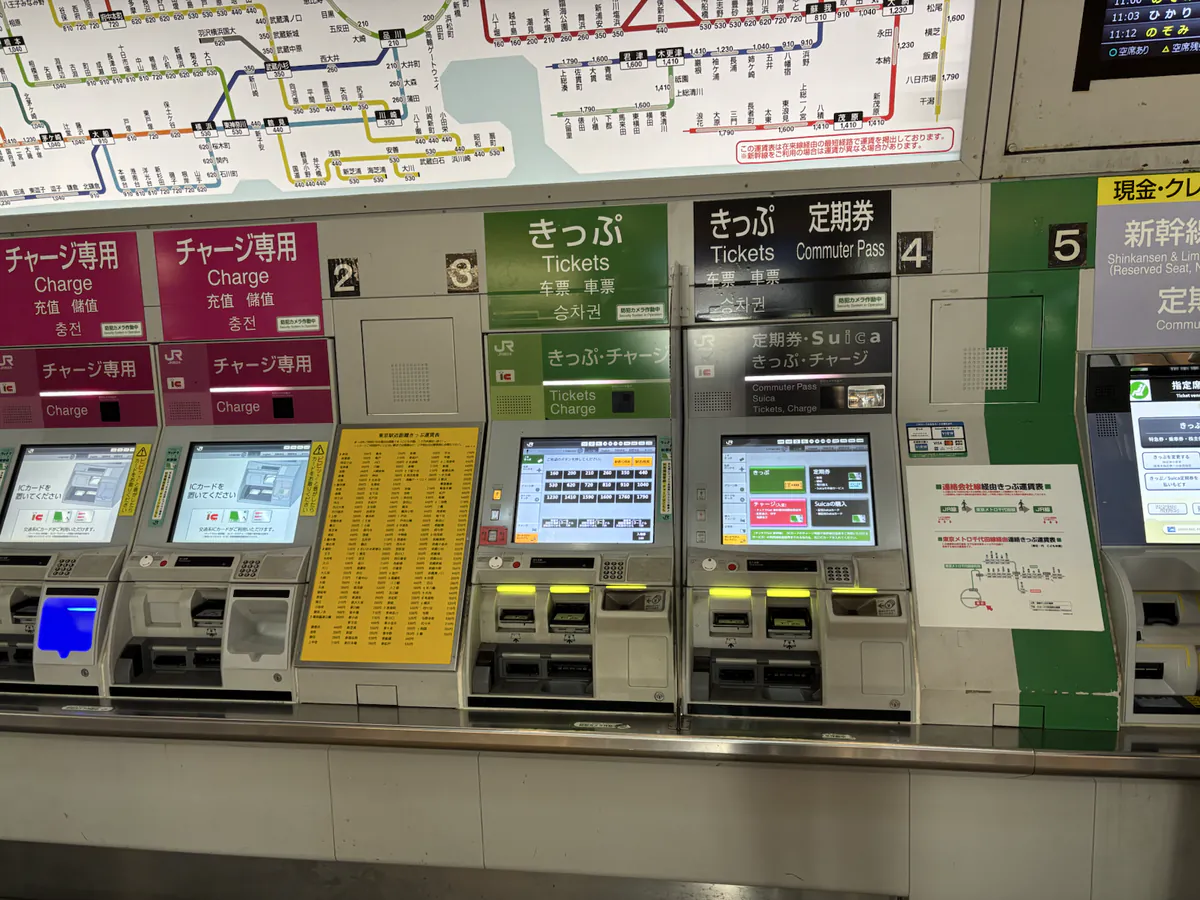
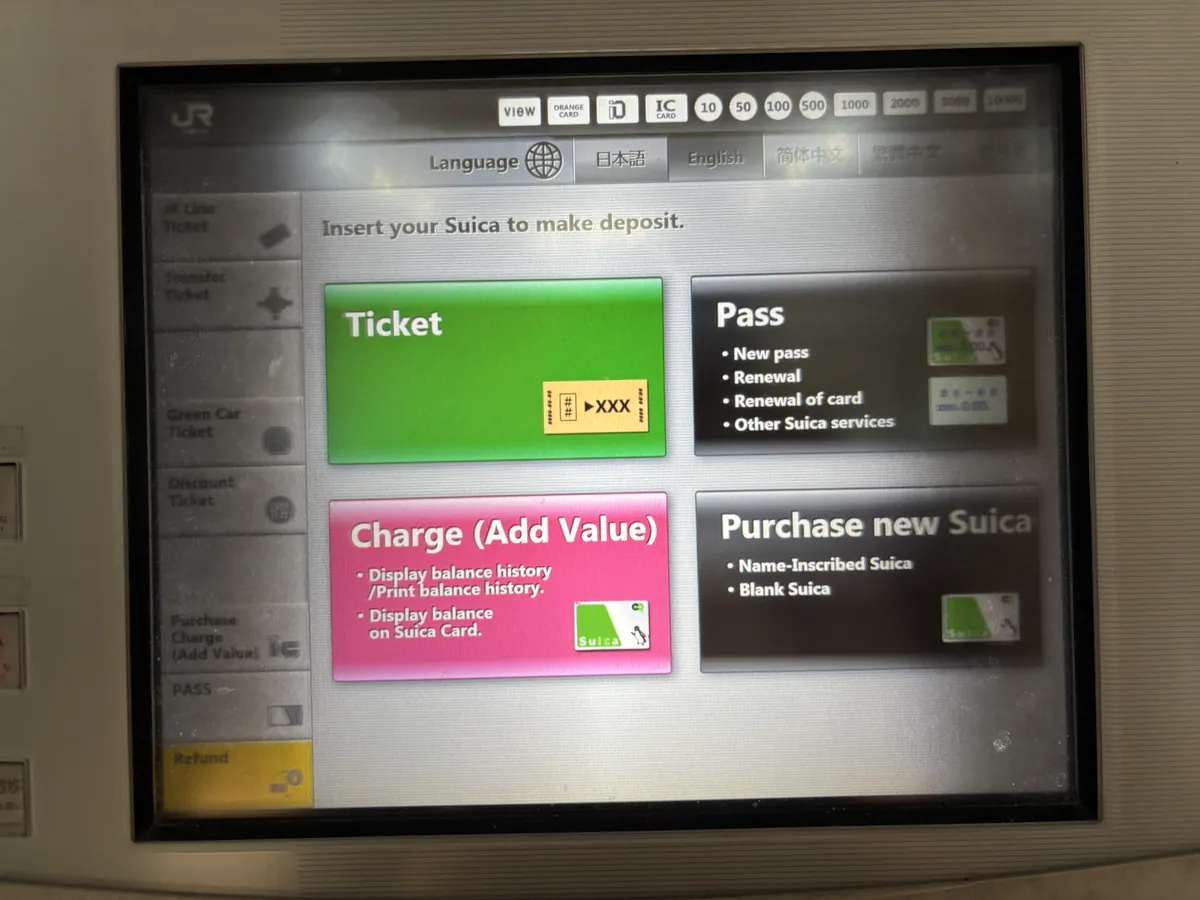
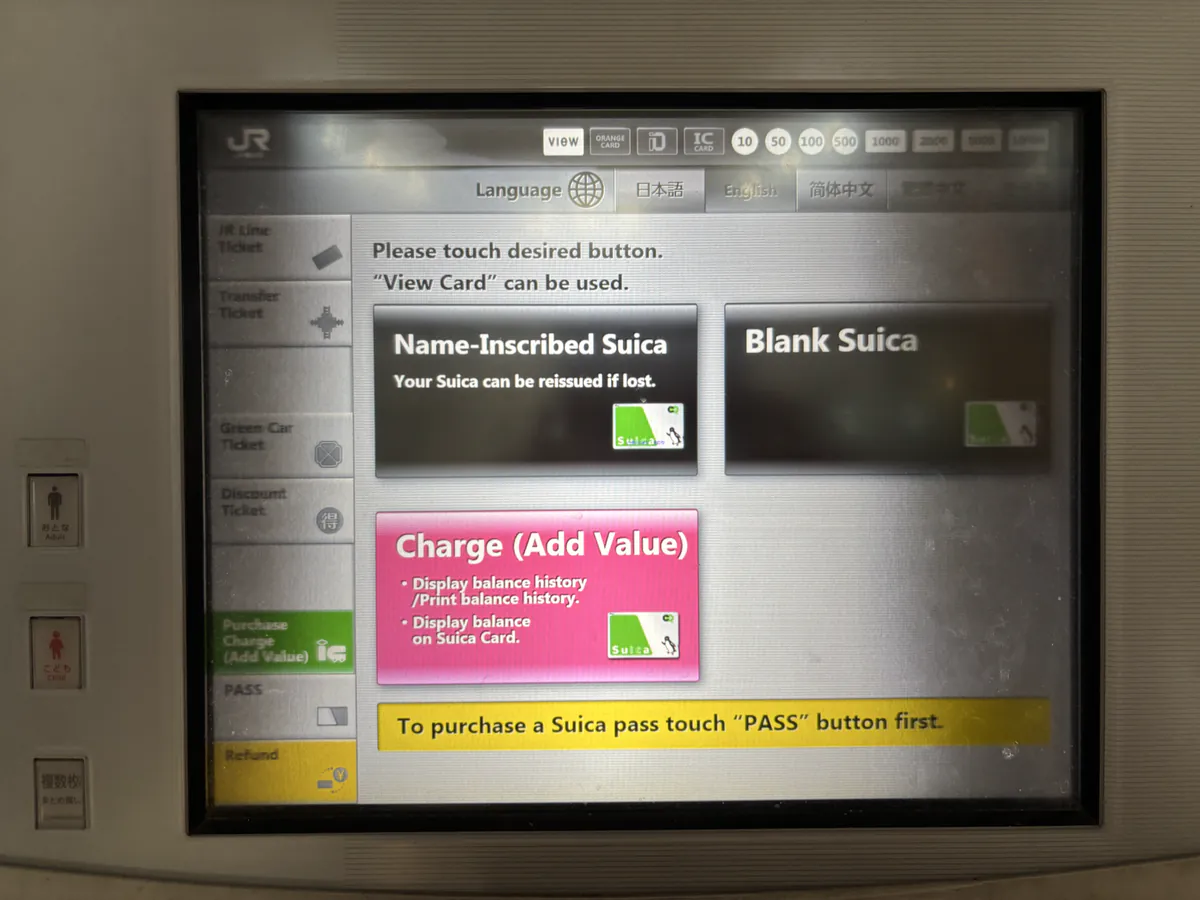
I photographed JR East’s ticket machines and the English purchase screens to show how to buy a new physical anonymous Suica. First, I recommend finding the black multifunction ticket machine; the other machines nearby are mainly for paper tickets, commuter passes, and charging an existing IC card. On the black machine, select “Purchase new Suica”, choose “Blank Suica,” then pay an amount that includes the refundable ¥500 deposit and your starting balance.
1. The quick answer
Use a black multifunction ticket machine
I recommend the black multifunction machine because, among the normal self-service machines at JR East stations, it sells a new adult Suica Card (anonymous) or My Suica (name-inscribed). Green and other machines are useful for tickets and charging, but do not assume that they can issue a new regular Suica.
Anonymous Suica sales resumed on March 1, 2025 after a temporary suspension caused by the global chip shortage. Availability can still vary by station, so ask a JR East staff member if the purchase button is not shown.
2. Where can you buy an anonymous Suica?
JR East lists three official sales channels for a regular adult Suica Card or My Suica:
- Multifunction ticket machines — the black machines at JR East stations; this is the easiest self-service choice.
- Midori no Madoguchi — JR East staffed ticket offices.
- Talking reserved-seat ticket machines — purchase with remote operator assistance.
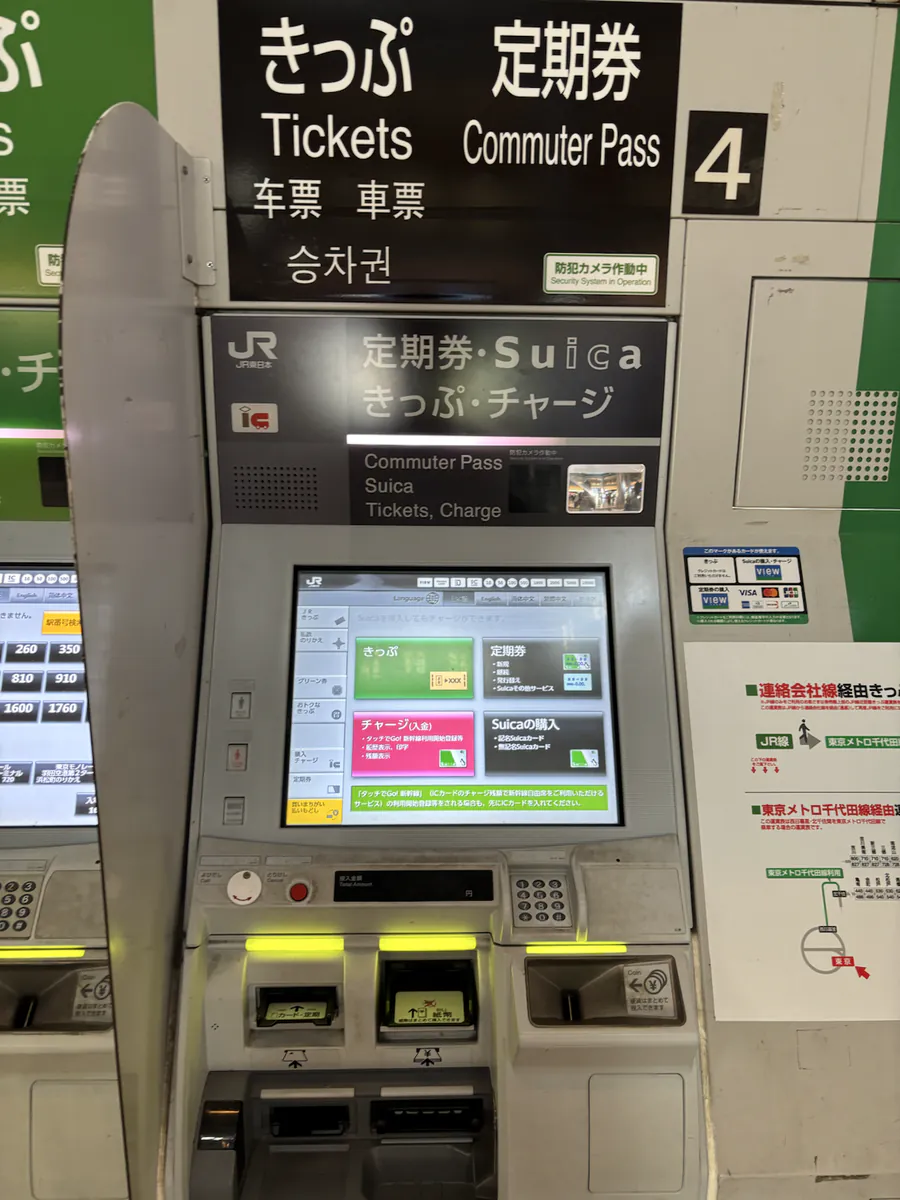
For an ordinary self-service purchase of a new Suica Card or My Suica, use the black multifunction machine. The neighboring green, purple, or charge-only machines are mainly for other ticketing and top-up tasks.
Not every station sells cards, including some stations with only partial Suica support. Before making a special trip, check JR East’s station facility search or ask station staff: “Suica card wa doko de kaemasu ka?” (Where can I buy a Suica card?).
3. How to use the Suica machine in English
- 1Find the black machine
At a JR East station, look for a black multifunction ticket machine. The exact layout can differ by station.
- 2Switch the screen to English
Tap the language button before starting if you prefer English.
- 3Tap “Purchase new Suica”
On the English home screen I photographed, this button is in the lower-right corner.
- 4Choose named or anonymous
Select “Name-Inscribed Suica” for My Suica or “Blank Suica” for an anonymous card. Either works for normal travel and shopping.
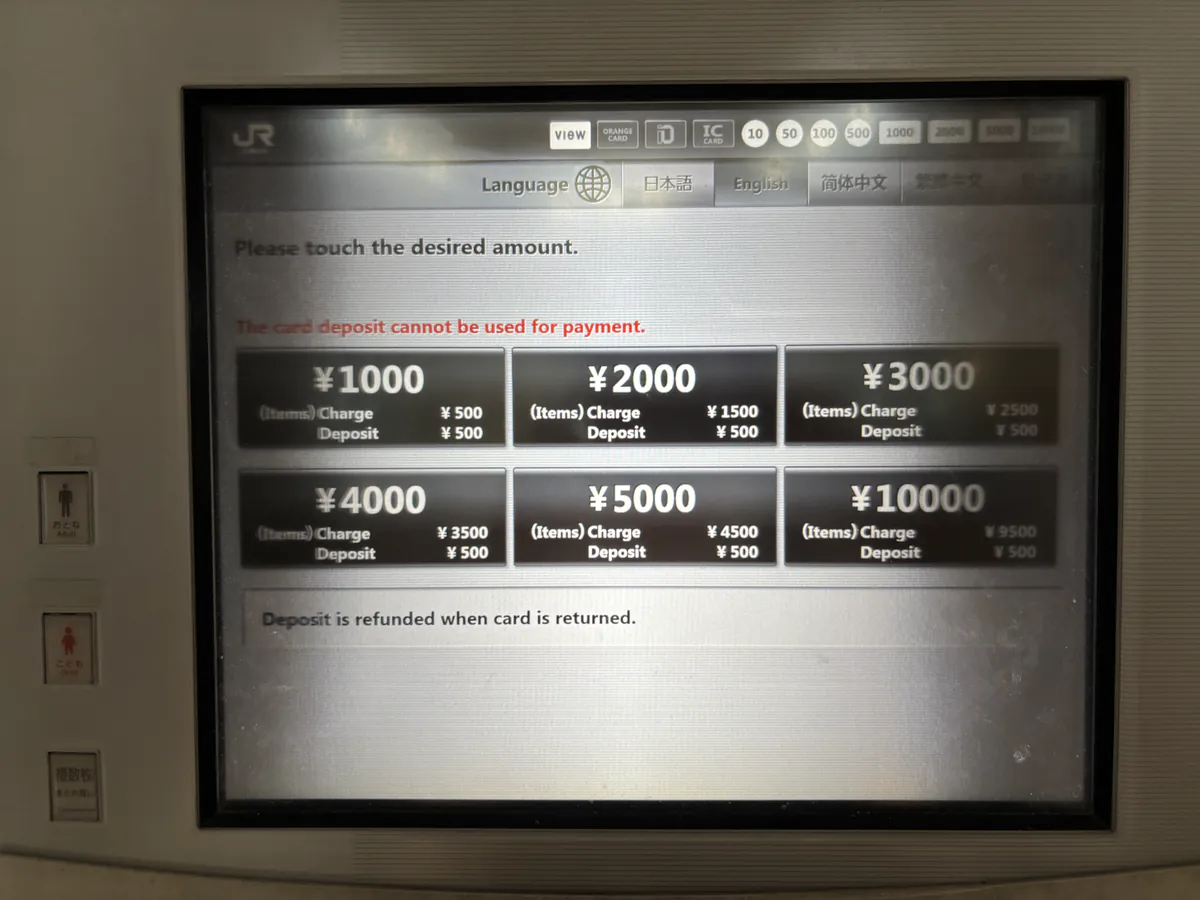
- 5Choose the total purchase amount
Select ¥1,000, ¥2,000, ¥3,000, ¥4,000, ¥5,000, or ¥10,000. This total includes the ¥500 deposit; the remainder is loaded onto the card.
- 6Pay and collect everything
Insert Japanese yen cash, then take the card, change, and receipt before leaving the machine.
You can register an anonymous Suica later
If you buy a Blank Suica and later decide that you want your name registered, JR East allows you to convert it to My Suica at a black multifunction ticket machine or a Midori no Madoguchi. The existing balance carries over. The reverse change—from My Suica back to an anonymous card—is not available.
I recommend ¥2,000 as a practical starting amount: ¥500 is held as the deposit and ¥1,500 is ready to use.
4. Price, balance, and the ¥500 deposit
There is no separate non-refundable “issuance fee” on a regular Suica. The amount shown on the purchase screen includes a refundable ¥500 card deposit, and the rest becomes usable stored value.
When you return the card to JR East, the ¥500 deposit is returned. A handling fee of up to ¥220 is deducted from any remaining balance, so using the balance down before your departure is usually simplest.
5. What international visitors should know
- Bring cash. JR East states that top-ups are cash-only, and foreign credit cards are not accepted for a standard card purchase. Carry Japanese yen to avoid problems.
- There is no ID check for the standard anonymous adult card. It is designed for quick, unregistered use.
- Treat it like cash. If an anonymous card is lost, it cannot be reissued and its balance cannot be recovered.
- It does not replace every ticket. Limited express, Shinkansen, and Green Car travel may require a separate fare or reservation ticket.
- Do not cross separate IC regions on one tap. Suica works across many compatible areas, but you generally cannot use it for one continuous trip between separate IC card regions.
6. Regular Suica or Welcome Suica?
| Feature | Anonymous Suica | Welcome Suica |
|---|---|---|
| Best for | Repeat visits or stays over 28 days | Short trips |
| Deposit | ¥500, refundable | No deposit |
| Validity | Invalid after 10 years without use | 28 days from purchase |
| Remaining balance refund | Available, with conditions | Not available |
| If lost | Cannot be reissued | Cannot be reissued |
Choose the regular anonymous Suica if you may return to Japan, want to keep the card, or need more than 28 days. Welcome Suica is convenient for a short visit, but its balance expires and is not refundable.
7. Charge it and start tapping
Running out of stored value does not make the card unusable. You can charge it again at compatible machines both outside and inside the ticket gates. Outside the gates, use an automatic ticket machine, black multifunction machine, or charge-only machine displaying the IC symbol. Inside the gates, look for a fare-adjustment or charge machine near the exit.
Insert or place the card as directed, choose Charge, select an amount, and pay in cash. You can add ¥500, ¥1,000, ¥2,000, ¥3,000, ¥5,000, or ¥10,000 at a time, up to a maximum card balance of ¥20,000.
At train gates, tap once when entering and once when exiting. The correct fare is deducted automatically. You can also use Suica on many buses and at stores, lockers, vending machines, and restaurants displaying a compatible IC card logo.
Do not worry. Use a fare-adjustment machine inside the gates to charge the card, then follow the displayed instructions and try the gate again.
8. What to do if the ticket gate shows an error
If the gate closes after you touch your Suica, stop and read the message on the gate display. A low balance is a common cause: at entry, the card needs at least the minimum IC fare; at exit, it needs enough value to cover the journey.
- 1Check the message and balance
If it says the balance is insufficient, use a nearby charge or fare-adjustment machine.
- 2Try one careful touch if the card was not read
Remove other IC cards from the wallet and hold only the Suica firmly over the reader. Do not keep tapping repeatedly.
- 3Go to the staffed gate for any other error
If the display tells you to ask staff—or charging does not solve it—show the card and explain that you cannot enter or exit. Staff can check and clear an incomplete gate record.
Say “Suica de hairenai desu” (I cannot enter with my Suica) or “Suica de derenai desu” (I cannot exit with my Suica), then hand the card to the attendant.
9. Quick FAQ
Can I buy anonymous Suica at Narita or Haneda Airport?
Airport availability and the product offered can change. If a regular anonymous card is unavailable, try a staffed JR East counter, a designated machine, or buy one later at a JR East station in central Tokyo.
Can two people share one card on the same train ride?
No. Each traveler needs a separate card because the system records an entry for one passenger at a time.
Can I use Suica in Kyoto or Osaka?
Yes, at many services that accept Japan’s nationwide interoperable IC cards. However, do not use it for one continuous journey across separate IC card regions.
Can I keep the card as a souvenir?
Yes. You do not have to return it. The deposit is only refunded when the card is returned.
I checked the details against JR East’s Suica Card and My Suica purchase guide, card change guide, English Suica guide, ticket-gate instructions, and Welcome Suica guide. I photographed the machines and English menus shown on this page, then compressed the images for faster loading. Menus and sales availability may change, so ask station staff if the option is not displayed.